Apps
Overview
Apps is the launcher — a single grid of every feature on UNIT, so you never have to remember which menu something lives under. The screen says as much: "Access all Unit Network features in one place."
Nothing here is unique to Apps. Every tile opens a screen documented elsewhere in this guide. What Apps gives you is one place to start from, and a useful picture of how much the platform actually does.
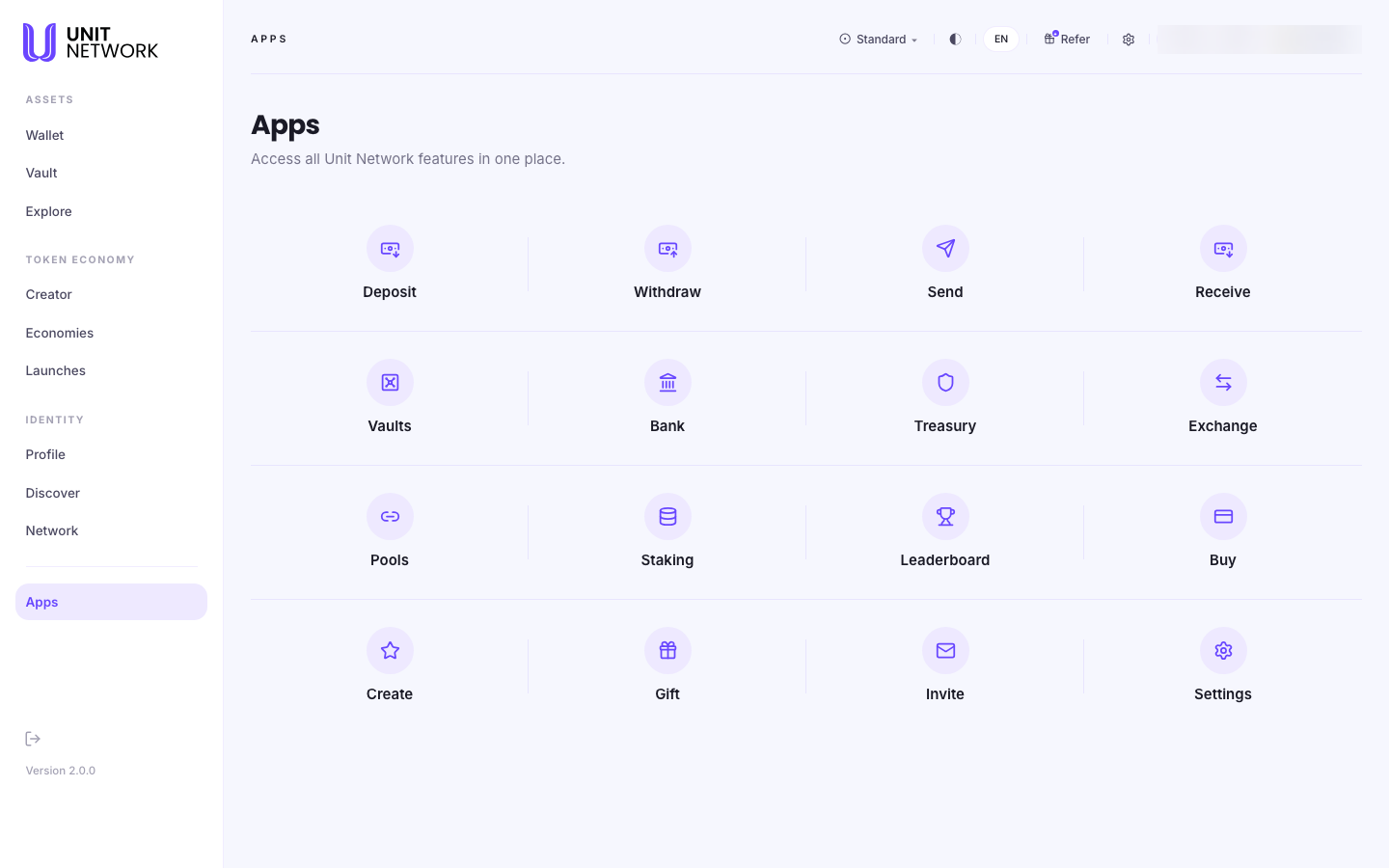
What You Can See
Sixteen tiles. They are not labelled into groups on screen, but they fall into five natural families.
Moving money
- Deposit
- Bring an asset in from an outside chain. Opens Deposit.
- Withdraw
- Send an asset back out to an outside chain. Opens Withdraw.
- Send
- Transfer to another UNIT account. Opens Send.
- Receive
- Show your address so somebody can send to you. Opens Receive.
- Gift
- Send tokens as a claimable gift rather than a direct transfer. Opens Gift.
Collateral
- Vaults
- Your collateral facilities. Opens My Vaults.
UNITCOIN's own screens
Six tiles are shortcuts to UNITCOIN's pages specifically, not to a general version of the feature. This is worth knowing: selecting Exchange here takes you to UNITCOIN's exchange, not to a picker where you choose a token first.
- Bank
- UNITCOIN's banking screen.
- Treasury
- UNITCOIN's treasury.
- Exchange
- Trade into and out of UNITCOIN. This is the same screen as Acquire reached from the token page.
- Pools
- UNITCOIN's liquidity pools.
- Staking
- Stake UNITCOIN to earn. The same screen the token page calls Earn.
- Leaderboard
- UNITCOIN's holder leaderboard.
To reach these screens for a different token, go through Explore and open that token's page instead.
Building and people
- Create
- Your creator workspace. Opens Creator Portfolio.
- Invite
- Jumps straight to the invite section of Your Network.
Account and outside links
- Settings
- Your account settings.
- Buy
- The one tile that leaves the application. It opens
buy.unit.network, a separate site for buying with ordinary money. Everything else on this screen stays inside UNIT. Wallet documents the same route at Buy.
Before You Begin
- Be signed in. Apps is your own launcher, and the tiles open your own screens.
- Nothing else. Apps itself does nothing and costs nothing — it only navigates. Whatever the screen behind a tile requires is described in that screen's own page.
How to Use This Screen
Open a feature
- Select Apps from the menu.
- Find the tile you want in the grid.
- Select it. You land directly on that screen — there is no intermediate step.
Reach a feature for a token other than UNITCOIN
- Do not use the Bank, Treasury, Exchange, Pools, Staking or Leaderboard tiles — those are UNITCOIN's.
- Go to Explore instead.
- Open the token you want.
- Use the actions on that token's own page.
Buy with ordinary money
- Select Buy.
- Note that you are leaving UNIT for
buy.unit.network. - Complete the purchase there, then return to UNIT to see the result in your wallet.
What Happens Next
Selecting a tile navigates — that is all it does. No transaction is created, nothing is signed, and nothing is charged. The screen you land on decides what happens after that.
The one exception is Buy, which hands you to a different site. You are no longer in the application at that point.
Tips
- Use Apps when you know the verb but not the menu. "I want to withdraw" is faster found here than by remembering that Withdraw lives under Wallet.
- Remember the six UNITCOIN tiles. Bank, Treasury, Exchange, Pools, Staking and Leaderboard are UNITCOIN's own — reaching those screens for another token means going through Explore.
- Buy leaves the app. It is the only tile that does.
- Apps is a good tour of the platform. If you are new, reading the sixteen labels tells you most of what UNIT can do.
Related Screens
- Wallet — where five of the tiles lead
- Explore — how to reach these features for other tokens
- My Vaults — behind the Vaults tile
- Your Network — behind the Invite tile
Frequently Asked Questions
- Is there anything on Apps I cannot reach elsewhere?
- No. Every tile opens a screen that also has its own route through the menus. Apps is a shortcut, not a separate feature.
- Why does Exchange open UNITCOIN and not ask me which token?
- Because that tile is a shortcut to UNITCOIN's exchange specifically. Six of the sixteen tiles work this way. For another token, open it from Explore.
- What is the difference between Send and Gift?
- Send transfers to an account you name. Gift creates something the recipient claims. Both are documented in Wallet.
- Why does Buy take me to another site?
- Buying with ordinary money happens at
buy.unit.network, outside the application. It is the only tile here that leaves UNIT. - What does Invite do?
- It jumps to the invite section of Your Network rather than opening a screen of its own.
Troubleshooting
- A tile opens a screen that says I need to do something first
- That is the destination screen talking, not Apps. Each screen's own page in this guide lists what it needs under Before You Begin.
- I wanted a different token's treasury and got UNITCOIN's
- Expected. Those six tiles are UNITCOIN's. Use Explore to open another token and work from its page.
- Buy opened a page that does not look like UNIT
- Correct — it is a separate site at
buy.unit.network. Return to the application when you are done.