Creator Portfolio
Overview
The Creator Portfolio is where every token you have created is gathered. It shows how many you have made, how many have an economy behind them, and how many are live — and it is where you start a new one.
It is a launch pad rather than a workspace. Selecting a token here does not open it in Creator; it takes you to that token's economy, which is where a token is actually run.
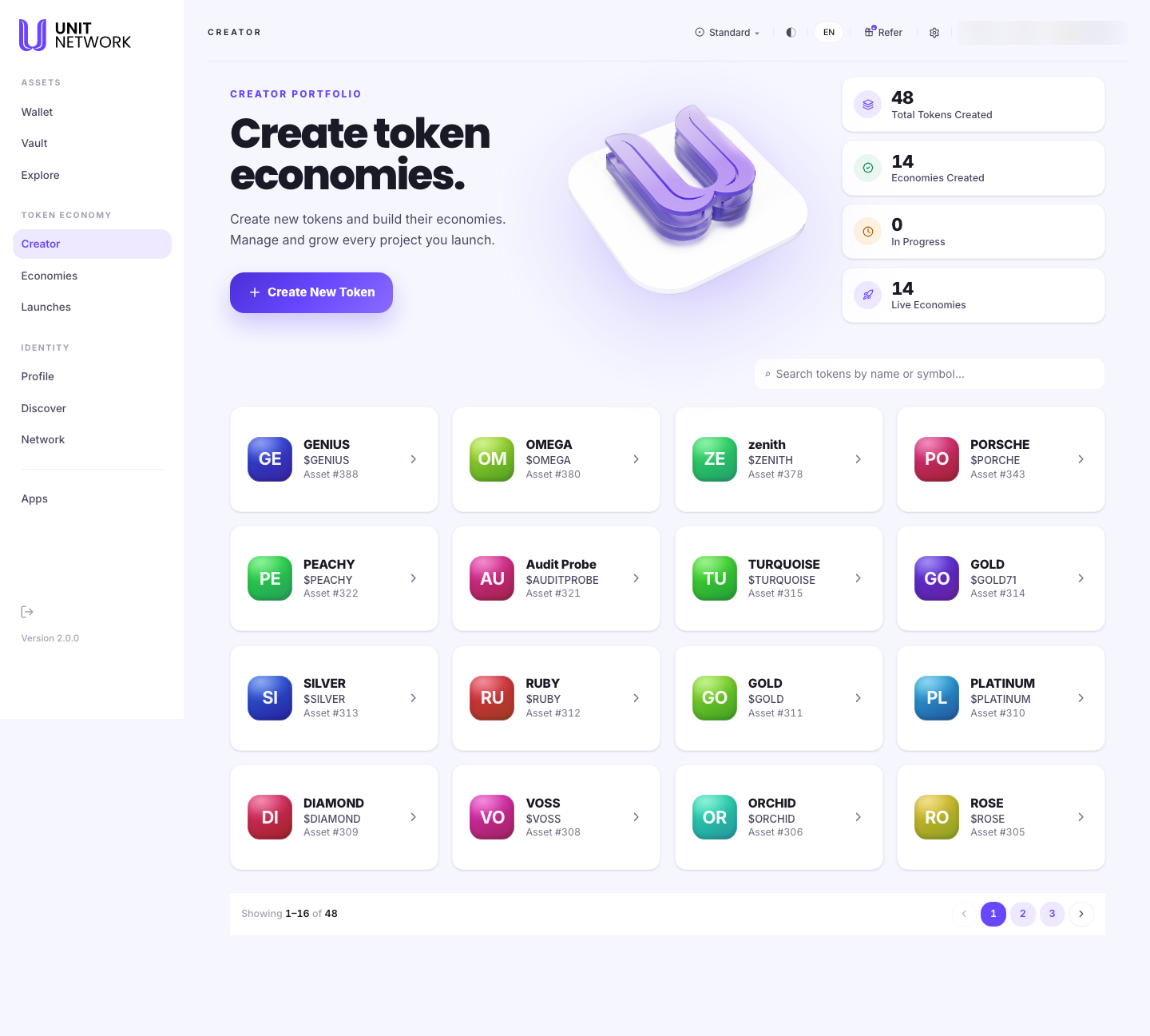
What You Can See
- Create New Token
- Starts a new token — see Create a Token.
- Total Tokens Created
- Every token you have ever created.
- Economies Created
- How many of those have an economy set up behind them. This is usually lower than the token count, because creating a token and building its economy are separate steps.
- In Progress
- Tokens part-way through creation.
- Live Economies
- How many economies are actually running.
- Search
- Filters your tokens by name or symbol — useful once the list runs to several pages.
- Token cards
- One per token: its initials, its name, its symbol and its asset number. The asset number is the token's permanent identifier on UNIT.
Before You Begin
- Nothing, to read this screen.
- To create a token you need a name and a symbol — see Create a Token.
How to Use This Screen
Review what you have created
- Select Creator from the menu.
- Read the four figures across the top for the shape of your portfolio.
- Compare Total Tokens Created with Economies Created — the difference is tokens that exist but have no economy behind them yet.
- Use the pager beneath the grid to see the rest.
Find one of your tokens
- Select the Search tokens by name or symbol field.
- Type the name or the symbol.
- Read the asset number on the card if you need to identify the token precisely — names can repeat, asset numbers do not.
Open a token to work on it
- Find the token in the grid.
- Select its card.
- The token's economy workspace opens, with tabs for Identity, Tokenomics & Reserves, Sales and Simulator. That is where a token is managed — see Economies.
What Happens Next
Creating a token brings you back here with the new token in the grid. Selecting any card leaves Creator for that token's economy.
That hand-off is deliberate: Creator makes tokens; Economies runs them. Nothing about a token's treasury, sales or tokenomics is edited in Creator.
Tips
- The asset number is the reliable identifier. Two of your tokens can share a name; they cannot share an asset number.
- A large gap between tokens created and economies created is normal — creating a token takes seconds, building its economy is the longer piece of work.
- Use search rather than paging once you have more than a page or two.
Related Screens
- Create a Token — making a new one
- Economies — where a token is managed
- Explore Markets — where your token appears publicly
- Launches — bringing a token to its first participants
Frequently Asked Questions
- Why does selecting a token take me out of Creator?
- Because Creator creates tokens; it does not manage them. Managing one — its identity, tokenomics, sales — happens in its economy.
- What is the difference between a token and an economy?
- The token is the asset itself. The economy is everything around it: its identity, supply, reserves and sales. Creating the token comes first; the economy is built afterwards.
- What does "In Progress" mean?
- A token part-way through creation — started but not yet finished.
- Can I delete a token I created?
- A token is on-chain once created. Its record stays.
Troubleshooting
- A token I created is not in the grid
- Clear the search field, then check the pager — the grid shows sixteen at a time.
- Two of my tokens have the same name
- That is allowed. Tell them apart by their asset numbers.
- My economy count has not gone up after creating a token
- Creating a token does not by itself create a running economy. Open the token to build it out.