Token Facts
Overview
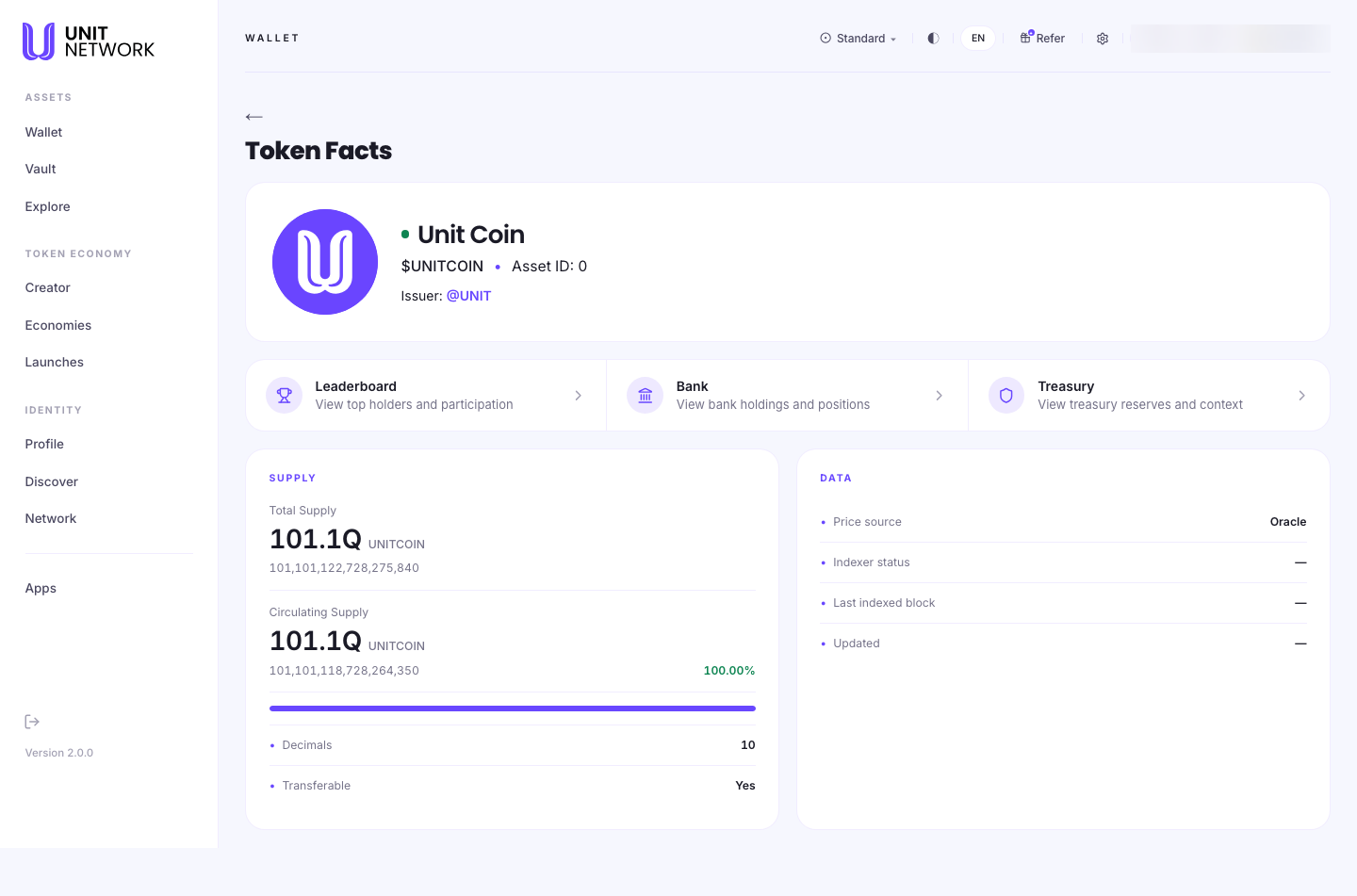
Token Facts is the reference sheet for a token — what it is, how much exists, and where its numbers come from. No opinions, no charts, just the record.
It is the page to open when you want to check something rather than trade it.
What You Can See
Identity
- Name and symbol
- The full name and the $SYMBOL people trade under.
- Asset ID
- The token's number on the chain. Useful because names and symbols can repeat across economies — the ID cannot.
- Issuer
- The handle that created it. Worth reading before you buy anything.
Supply
- Total Supply
- Everything that exists, shown rounded and then in full. The exact figure matters when the rounded one hides the difference.
- Circulating Supply
- What is actually out there, with its share of the total as a percentage. A circulating share well under 100% means much of the supply is held back.
- Decimals
- How finely the token divides.
- Transferable
- Whether it can be moved at all.
Data
Unusually candid, and worth knowing about: the page tells you where its own numbers come from.
- Price source
- Where the price is taken from — an oracle, for instance.
- Indexer status
- Whether the service that reads the chain is keeping up.
- Last indexed block
- How far it has read.
- Updated
- When this page was last refreshed.
If a figure elsewhere looks stale, this is where you find out whether it is.
Three ways deeper
Links to Leaderboard, Bank and Treasury — holders, bank positions and reserves.
Before You Begin
- Nothing. Token Facts is public and read-only.
- A token in mind, reached from Explore.
How to Use This Screen
Check a token before buying it
- Open the token from Explore and go to its facts.
- Read the issuer — who stands behind it.
- Compare circulating against total supply. A small circulating share means most of it is held somewhere.
- Check Transferable.
- Follow through to Treasury to see what backs it.
Confirm you have the right token
- Read the Asset ID rather than the symbol.
- Check the issuer handle matches who you expect.
- Use the ID when searching elsewhere in the application.
Work out whether a figure is current
- Read indexer status.
- Check last indexed block and updated.
- If the indexer is behind, treat derived figures as lagging rather than wrong.
Tips
- The Asset ID is the reliable identifier. Symbols can be reused; IDs cannot.
- Read circulating against total. The gap is the part of the story a price does not tell you.
- The exact supply figure is given alongside the rounded one for a reason — use it when precision matters.
- The Data block is the guide's answer to "is this number stale?"
Related Screens
- Token Bank · Liquidity · Leaderboard
- The Token Page — the token's main page
- Treasury Overview — what backs it
Frequently Asked Questions
- What is an Asset ID?
- The token's number on the chain — the identifier that cannot be duplicated.
- Why show supply twice?
- Once rounded for reading, once exact for checking.
- What does Transferable mean?
- Whether the token can be moved between accounts at all.
- What is the indexer?
- The service that reads the chain so pages can display it. Its status tells you whether what you are reading is current.
Troubleshooting
- Figures look out of date
- Check indexer status and last indexed block in the Data section.
- Two tokens have the same symbol
- Compare their Asset ID and issuer.
- Circulating supply is far below total
- Not an error. Much of the supply is held — check the supply distribution for where.