Liquidity
Overview
Liquidity is where you put a pair of assets into a pool so other people can trade between them — and earn a share of the fees for doing it.
Two tabs: Add Liquidity and Remove Liquidity.
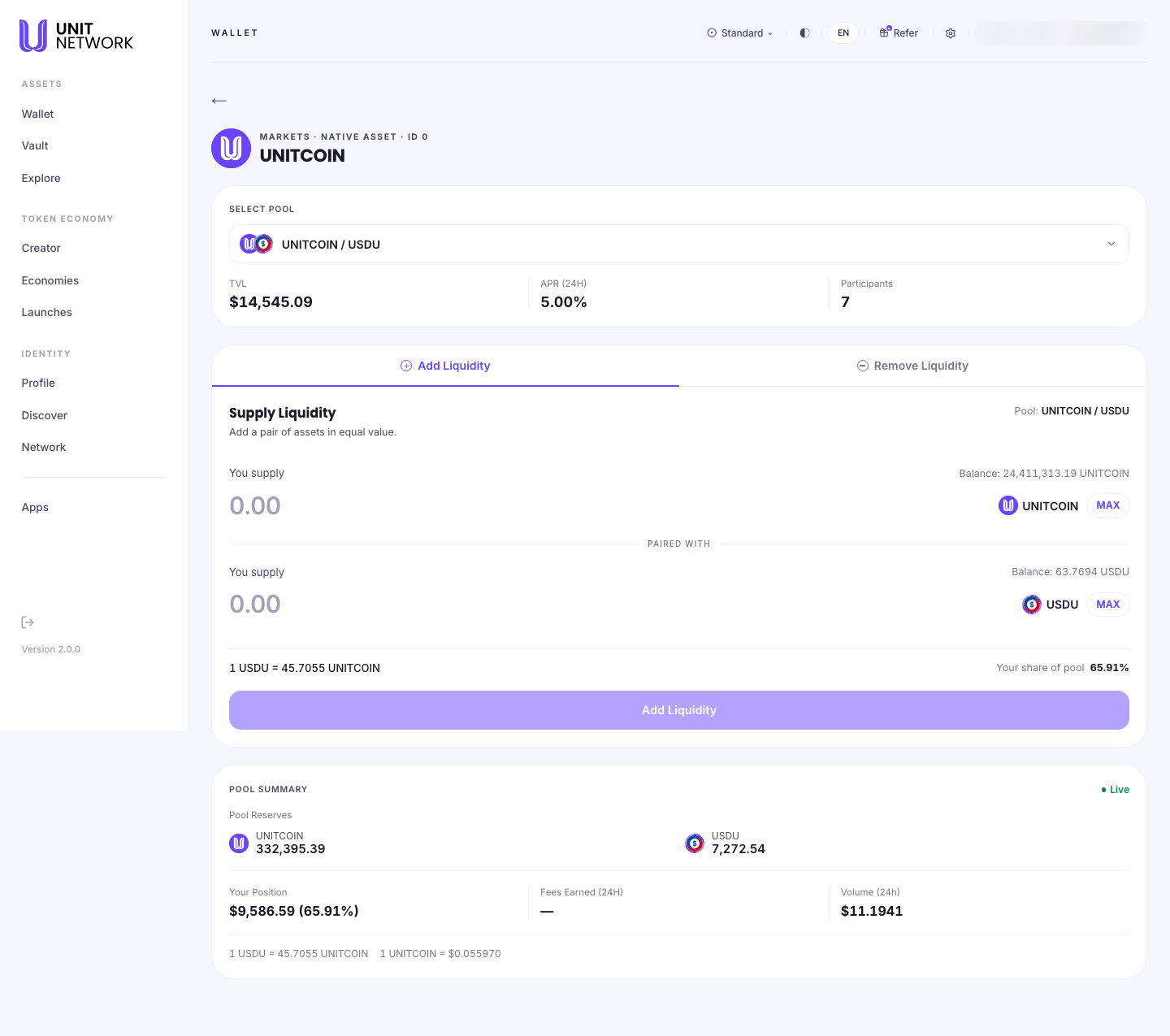
What You Can See
Select pool
A token can have more than one pool, so you choose the pair first. Each shows TVL (total value locked), APR (24H) and participants — depth, return and how many people are in it.
Supply liquidity
The instruction is the important part: "add a pair of assets in equal value." You are not depositing one thing — you are supplying both sides, matched by value.
- The two supply fields
- One per asset, each with your balance and a MAX control, joined by PAIRED WITH.
- The rate
- What one asset is worth in the other, so you can see the ratio you are supplying at.
- Your share of pool
- What proportion of the pool you would hold. This is what your fee earnings are proportional to.
Pool summary
- Live Pool Reserves
- How much of each asset the pool holds right now.
- Your Position
- What your share is worth, in dollars and as a percentage.
- Fees Earned (24H)
- What your position has earned in the last day.
- Volume (24h)
- How much trading went through. Fees come from volume, so a pool with none earns nothing however large it is.
Before You Begin
- Both assets in the pair, in roughly equal value. One alone is not enough.
- Enough left for the fee.
- An understanding that your position moves. A pool holds a changing mix as people trade, so what you withdraw later is not necessarily what you put in.
How to Use This Screen
Add liquidity
- Open the token and select Liquidity.
- Choose a pool, reading its TVL, APR and participants.
- Stay on Add Liquidity.
- Enter an amount for one side. Supply the paired asset to match in value.
- Check your share of pool — that is your claim on future fees.
- Select Add Liquidity, then review and sign.
Judge whether a pool is worth joining
- Read APR (24H) — but do not stop there.
- Read Volume (24h). Fees come from trading, and a pool with no volume pays nothing.
- Read TVL and participants — a large share of a small pool is a different proposition from a small share of a deep one.
- Check Fees Earned (24H) against an existing position for what the rate means in practice.
Remove liquidity
- Select the Remove Liquidity tab.
- Check Your Position for what it is currently worth.
- Choose how much to withdraw.
- Review and sign. Both sides of the pair come back, in the pool's current ratio.
What Happens Next
Supplied assets leave your wallet and become a share of the pool. From then on you earn a proportion of the trading fees, and your position changes as the pool's mix changes.
Removing returns both assets — in whatever ratio the pool holds at that moment, which will not be the ratio you supplied at.
Tips
- Read volume before APR. A rate with no trading behind it is theoretical.
- You supply both sides. Have the pair ready before you start.
- Your share is what earns. It is the number to watch, not the amount.
- What you withdraw will not be the same mix you deposited — that is how pools work, not a fault.
- Compare Fees Earned (24H) with your position size for the real return.
Related Screens
- Acquire — trading against these pools
- Token Facts · Token Bank · Leaderboard
- Treasury History — where pool fees end up for the token
- Earn — a different way to earn on a token
Frequently Asked Questions
- Why do I have to supply two assets?
- A pool exists to trade between a pair, so it needs both sides. The screen asks for them "in equal value."
- How do I earn?
- A share of the trading fees, proportional to your share of the pool.
- Will I get back exactly what I put in?
- Not necessarily. You withdraw your share of the pool as it stands then, in its current ratio.
- What is TVL?
- Total value locked — how much the pool holds altogether.
- Why is APR high but fees earned nothing?
- Because fees come from volume. Check Volume (24h).
- Is this the same as staking?
- No. Staking commits one token for a set rate; liquidity supplies a pair and earns from trading.
Troubleshooting
- Add Liquidity will not proceed
- Check you have both assets, that the amounts match in value, and that you can cover the fee.
- My position is worth less than I supplied
- A pool's mix changes as people trade. Read Your Position for the current value.
- I earned no fees
- Check Volume (24h). No trading means no fees.
- I cannot find the pool I want
- Use Select pool — a token may have several, and it may have none.