Treasury History
Overview
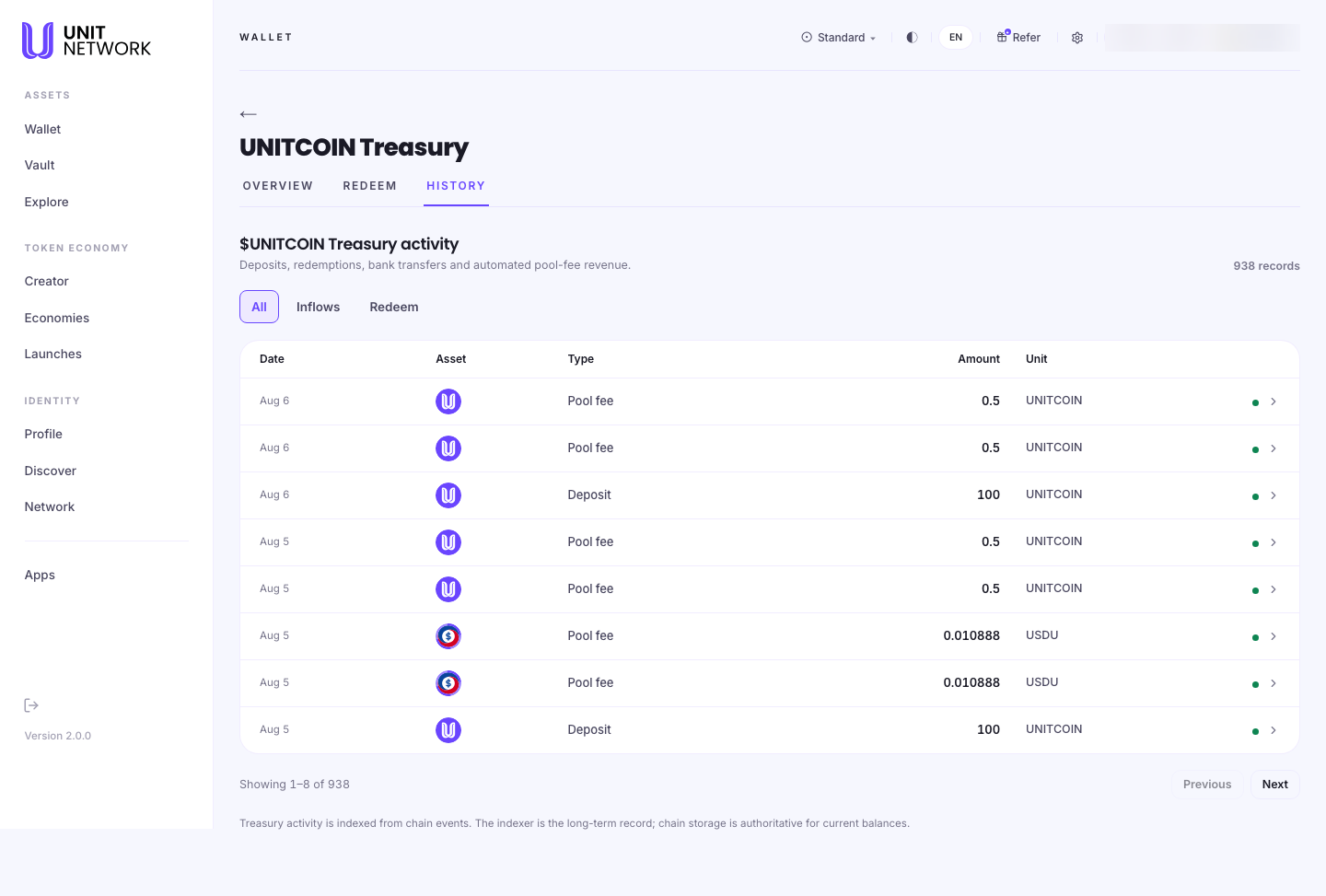
History is the treasury's ledger — "Deposits, redemptions, bank transfers and automated pool-fee revenue." Everything that has moved in or out, in order, with a running count of records.
It is public, like the rest of the treasury. Anyone assessing a token can read how its reserve was built rather than taking the current total on trust.
What You Can See
The record count
A total sits beneath the heading — 938 records in the example. It tells you how much history there is before you start paging.
Filters
- All
- Everything.
- Inflows
- What has come in — deposits and revenue.
- Redeem
- What has gone out through redemption.
The columns
- Date
- When it happened.
- Asset
- Which asset moved.
- Type
- What kind of movement. Deposit is a contribution into the reserve; Pool fee is revenue arriving automatically from trading activity.
- Amount and Unit
- Split into two columns, so the number and the token it is denominated in stay readable side by side.
Pool fee — the treasury earning on its own
A treasury does not only grow by deposit. Pool fee entries are revenue from trading in the token's liquidity pools, arriving automatically. A run of small pool-fee rows is a token whose treasury is being fed by its own market activity.
Where the record comes from
The footnote is worth reading: "Treasury activity is indexed from chain events. The indexer is the long-term record; chain storage is authoritative for current balances."
In other words, use History for what happened over time, and the overview for what is true right now.
Before You Begin
- Nothing. Treasury history is public and needs no account.
- A question in mind. With hundreds of records, the filters are more useful than scrolling.
How to Use This Screen
See how a reserve was built
- Open the token's treasury and select HISTORY.
- Select Inflows.
- Look at the Type column. Mostly Deposit means the reserve was funded deliberately; mostly Pool fee means it accumulated from trading.
- Page back through the dates to see how far the pattern goes.
Check redemption activity
- Select Redeem.
- Read the amounts and dates. Steady redemption is a reserve being drawn down.
- Compare with the current reserve value.
Find your own redemption
- Select Redeem and look at the most recent dates.
- Match on date, asset and amount.
- Your own record of it is also in your wallet history.
What Happens Next
Nothing — History is a reading screen. New entries appear as activity is indexed from chain events.
Tips
- Read the record count before paging. It tells you the scale of what you are looking at.
- Pool fee entries are the interesting ones. They show a treasury growing without anyone having to fund it.
- Use Inflows versus Redeem to see whether a reserve is building or being drawn down.
- For current balances trust the overview, not a sum of the history.
Related Screens
- Treasury Overview — the current position
- Redeem — what creates the outflow entries
- Acquire — the pools that generate pool-fee revenue
Frequently Asked Questions
- What is a pool fee?
- Revenue from trading in the token's liquidity pools, arriving in the treasury automatically.
- Can I see other people's redemptions?
- The ledger records the movements. It is a public record of the treasury, not of individuals.
- Why do the amounts not add up to the reserve value?
- The footnote explains it — history is the indexed long-term record, while chain storage is authoritative for current balances. Read the overview for the position now.
- How far back does it go?
- To the beginning of indexed activity. The record count tells you how many entries there are.
- What is a bank transfer here?
- One of the movement types the screen lists as recorded, alongside deposits, redemptions and pool-fee revenue.
Troubleshooting
- My redemption is not showing
- Entries are indexed from chain events, so allow a moment. Check the Redeem filter is selected.
- The table looks empty
- Check which filter is active — Redeem shows nothing on a treasury nobody has redeemed against.
- The totals disagree with the overview
- Expected. The overview reads current chain storage; history is the indexed trail.