Tokenomics & Reserves
Overview
Tokenomics & Reserves is the economics of your token: how much exists, where it is held, what backs it, and how it is distributed. It is the tab that answers what is actually in this economy?
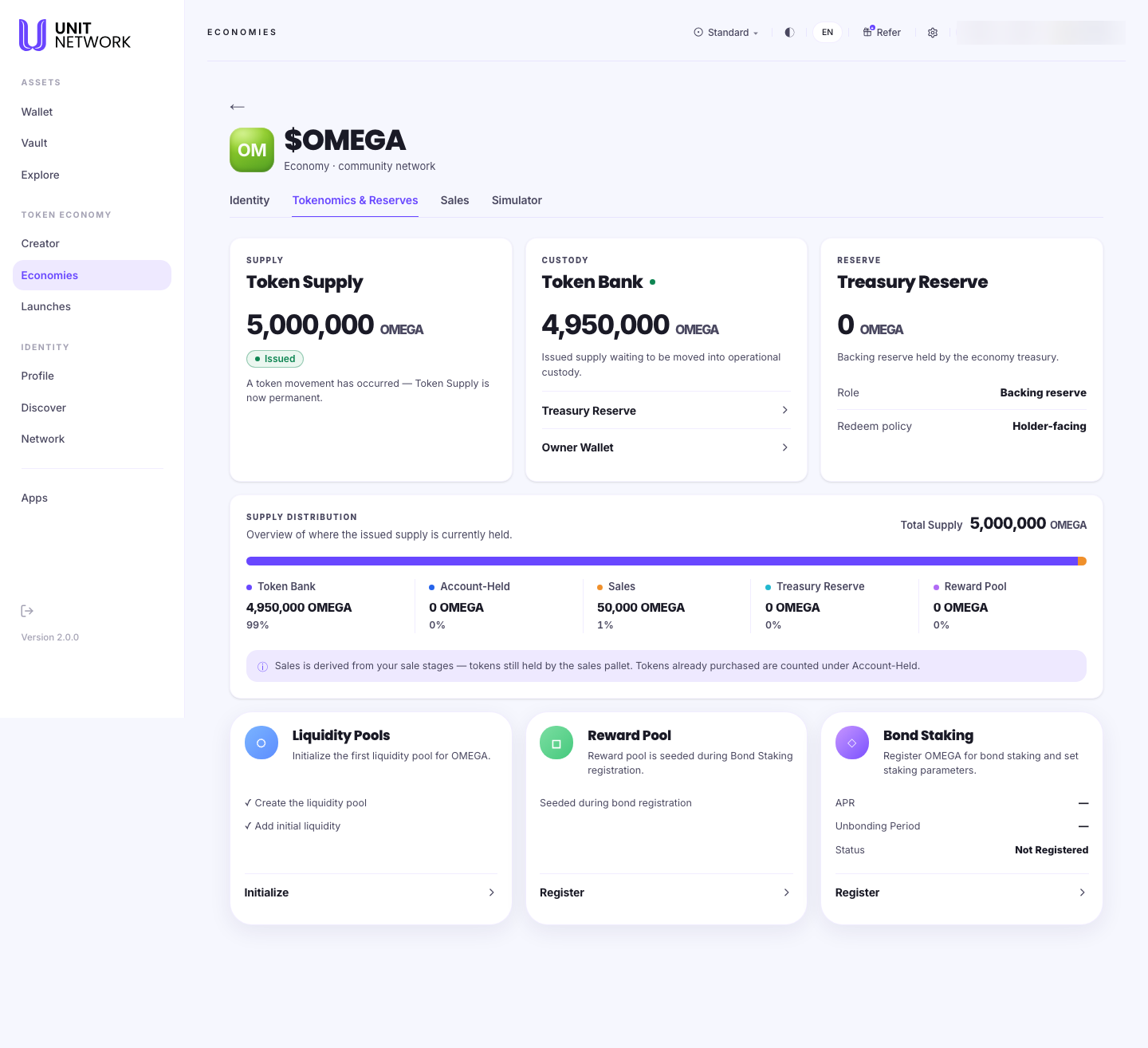
Reaching this tab
Open the economy from your Economy Portfolio and select the tab. Every workspace tab is reached that way — the workspace needs to know which token it is working on, and opening it from the portfolio is what tells it.
What You Can See
- Token Supply
- How much of the token exists. Once a token has moved, supply becomes permanent and the screen says so — it is not something you can revise later.
- Token Bank
- Issued supply that has not yet been moved into operational custody. On a new economy this is most of the supply. Controls beside it move value to the Treasury Reserve or the Owner Wallet.
- Treasury Reserve
- The backing reserve held by the economy treasury. Two properties are stated: its role (backing reserve) and its redeem policy (holder-facing) — meaning holders can redeem against it.
- Supply Distribution
- Where the issued supply currently sits, as amounts and percentages: Token Bank, Account-Held, Sales, Treasury Reserve and Reward Pool. Sales is derived from your sale stages rather than set here.
Before You Begin
- A decision about supply, if the token has not moved yet. It becomes permanent once it has.
- A plan for the split — how much stays in the token bank, how much backs the token in the treasury, how much goes to sales.
How to Use This Screen
Read the economy's position
- Open the economy from your portfolio and select Tokenomics & Reserves.
- Read Token Supply — the total that exists, and whether it is now permanent.
- Read Token Bank — supply issued but not yet put to work.
- Read Treasury Reserve — what backs the token for holders.
- Read Supply Distribution for the whole picture in percentages.
Move supply into custody
- Find the Token Bank figure.
- Choose where the supply should go: Treasury Reserve to back the token, or Owner Wallet to hold it yourself.
- Confirm and sign.
- Check Supply Distribution — the percentages move to match.
What Happens Next
Supply moved to the treasury becomes the reserve backing your token, visible to holders on the token's pages. Supply allocated to sales appears in the distribution once you set up sale stages on the Sales tab.
Tips
- Supply becomes permanent once the token moves. Decide it before the first movement, not after.
- A distribution that is 99% token bank means the economy has not started — most new economies look like this.
- The treasury reserve is what gives holders something to redeem against. An economy with none is not backed.
- You cannot set the Sales figure here; it follows from the stages you create.
Related Screens
- Sales — where the sales allocation comes from
- Simulator — model a distribution before committing to it
- Treasury — the treasury from a holder's side
- Reward Pool — the reward pool line in the distribution
Frequently Asked Questions
- Why can I not change the supply?
- Because the token has already moved. The screen states that supply becomes permanent at that point.
- What is the token bank for?
- It holds issued supply that has not been put to work yet — a staging area between issuing and allocating.
- What does "holder-facing" redeem policy mean?
- Holders can redeem against the treasury reserve.
- Why is my Sales figure zero?
- Sales is derived from your sale stages. Create one on the Sales tab.
Troubleshooting
- The percentages do not add up as I expect
- All five lines — token bank, account-held, sales, treasury reserve and reward pool — are shares of total supply. Read them together.
- A move has not shown up
- Confirm the signature was approved, then re-read Supply Distribution.
- Treasury Reserve is zero
- Nothing has been moved into it yet. Use the control beside the token bank.