Economy Portfolio
Overview
The Economy Portfolio is the front door to everything you operate. It shows how many economies you have, how far along each is, and it is where you open one to work on it.
Every token you create gets an economy. The portfolio is where those economies gather, and the four figures across the top tell you how much of the work is done.
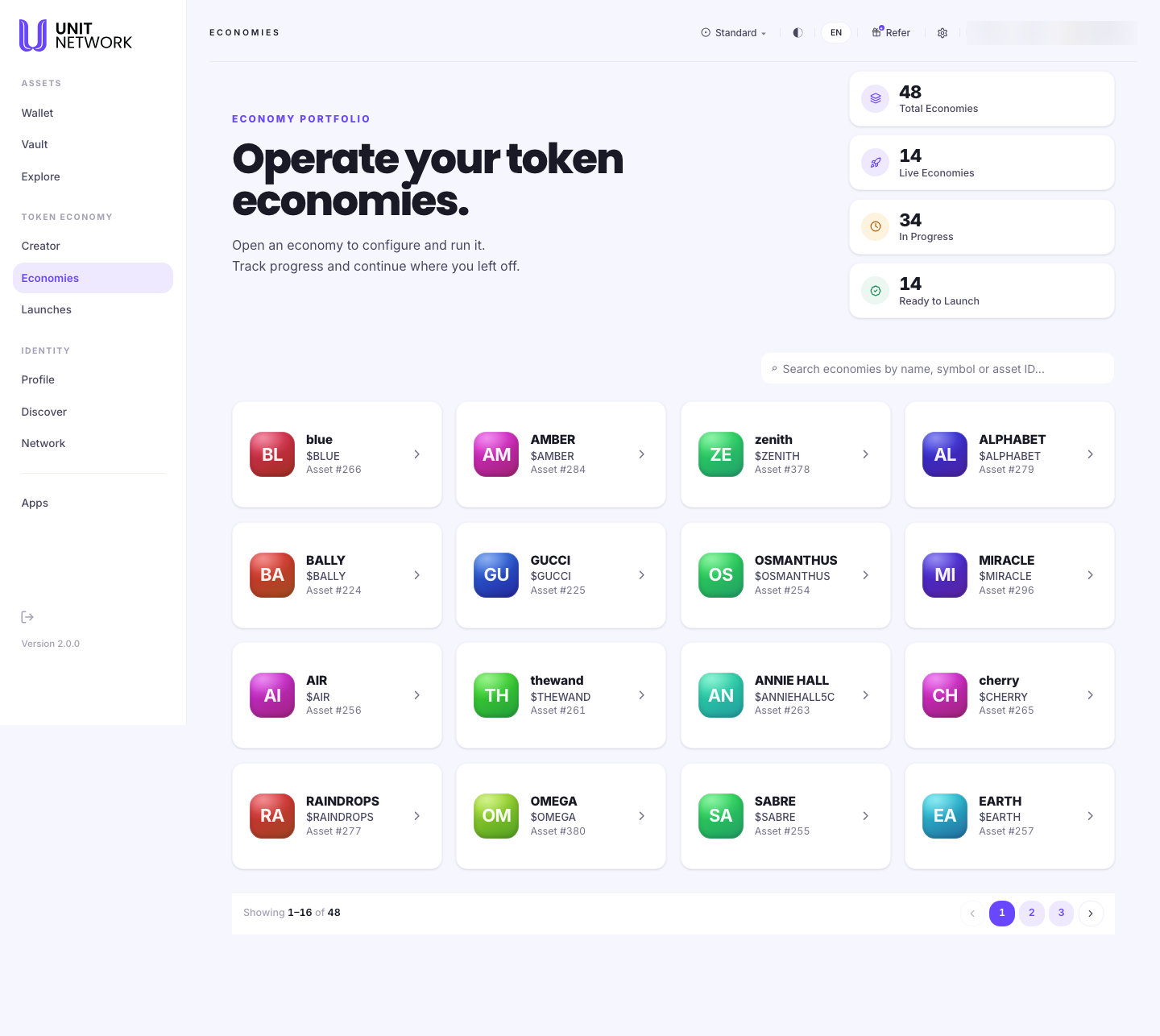
What You Can See
- Total Economies
- One for every token you have created.
- Live Economies
- Those that are running.
- In Progress
- Those still being set up. This is usually the largest number, and that is normal — setting up an economy is the substantial work.
- Ready to Launch
- Those configured enough to bring to participants.
- Search
- Filters by name, symbol or asset ID — the asset ID is the reliable one when names repeat.
- Economy cards
- One per economy: initials, name, symbol and asset number. Selecting one opens its workspace.
Before You Begin
- At least one token. Economies are created from tokens — see Create a Token.
- Nothing else to read this screen.
How to Use This Screen
See where your work stands
- Select Economies from the menu.
- Read the four figures. In Progress against Live is the quickest read on how much is left to do.
- Compare Ready to Launch with Live — the difference is economies configured but not yet brought to participants.
Open an economy to work on it
- Find it in the grid, or search by name, symbol or asset ID.
- Select its card.
- The workspace opens on Identity, with tabs for Tokenomics & Reserves, Sales and Simulator.
What Happens Next
Selecting a card opens that economy's workspace, and everything you do to an economy happens there. The portfolio does not change anything by itself.
Tips
- Always open an economy from here. The workspace needs to know which token it is working on, and arriving from the portfolio is what tells it.
- Search by asset ID when you have tokens with similar names — it is unique.
- A high In Progress count is not a backlog. Creating a token takes seconds; building its economy is the real work.
Related Screens
- Identity — the first tab of the workspace
- Creator Portfolio — where tokens are created
- Launches — bringing an economy to participants
Frequently Asked Questions
- What is the difference between this and the Creator Portfolio?
- Creator is where tokens are made. Economies is where they are run. The same assets appear in both, counted differently — Creator counts tokens created, Economies counts how far each economy has got.
- Why do I have 48 economies when I only set up a few?
- Every token you create gets an economy. Most are counted as In Progress until you configure them.
- What makes an economy "Ready to Launch"?
- Enough configuration to bring it to participants. The remaining work is in Launches.
Troubleshooting
- An economy is missing from the grid
- Clear the search field and check the pager — the grid shows sixteen at a time across three pages.
- Two economies have the same name
- Tell them apart by asset number, and search by asset ID.
- I opened a workspace and it says no economies were found
- Go back to the portfolio and open the economy from its card rather than by editing the address.