Simulator
Overview
The Simulator lets you try out an economy before committing to it. Choose the kind of economy you want, set your goals, and it shows you what that allocation implies.
Nothing here is saved or applied. The screen says so twice — "Nothing you do here is saved or applied to your economy" and "results are never written back". It is a sandbox, and that is what makes it useful: you can be wrong in it for free.
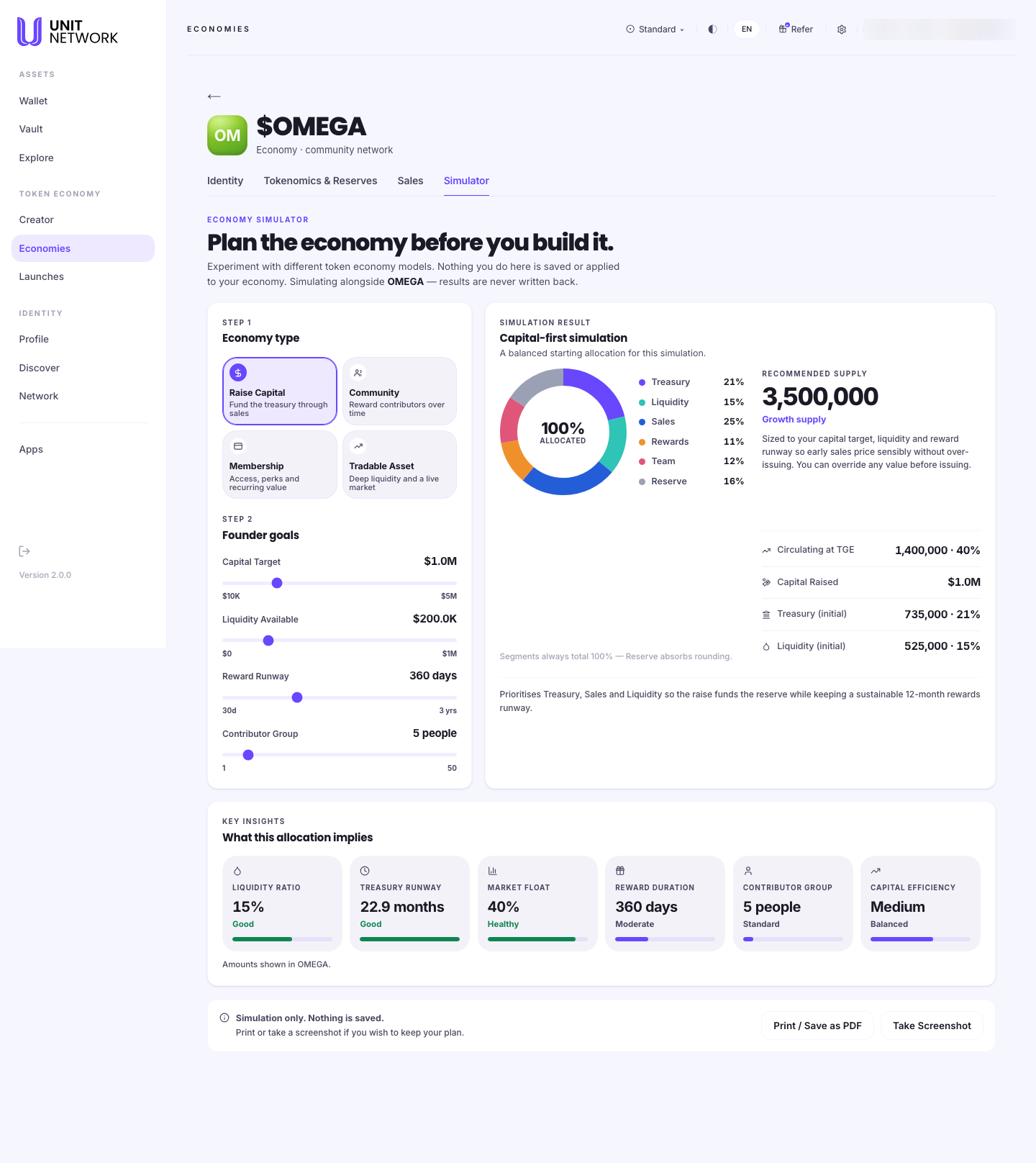
Open the economy from your Economy Portfolio and select the tab. Every workspace tab is reached that way — the workspace needs to know which token it is working on, and opening it from the portfolio is what tells it.
What You Can See
- Economy type
- Four models to start from: Raise Capital — fund the treasury through sales; Community — reward contributors over time; Membership — access, perks and recurring value; Tradable Asset — deep liquidity and a live market. They are genuinely different shapes of economy, not presets of the same one.
- Founder goals
- Four sliders: Capital Target, Liquidity Available, Reward Runway (how long rewards last) and Contributor Group (how many people you are rewarding).
- Simulation Result
- What your choices imply — the shape of the resulting economy, and what that allocation means in practice.
- Print and Screenshot
- Take the result away to share or keep. Since nothing is saved, this is how a simulation survives.
Before You Begin
- A rough idea of what you want the economy to do — raise money, reward people, sell access, or trade.
- Nothing at risk. No balance is needed and nothing can be committed by accident.
How to Use This Screen
- Open the economy from your portfolio and select Simulator.
- Step 1 — choose an Economy type. Read all four descriptions before picking; they lead to different results.
- Step 2 — set your Founder goals with the sliders. Each has a range, so you can see what is reasonable.
- Read the Simulation Result and the note on what the allocation implies.
- Change one slider at a time and watch what moves. One variable at a time is how you learn which matters.
- Select Print / Save as PDF or Take Screenshot to keep a version worth remembering.
- When you have a shape you like, build it for real on Tokenomics & Reserves and Sales.
What Happens Next
Nothing — by design. Leaving the tab discards the simulation, and your economy is untouched.
To act on what you learned, go to Tokenomics & Reserves to set the supply split, and Sales to create the stages.
Tips
- Use it before you commit anything. Supply becomes permanent once a token moves; the simulator is the only place to be wrong without consequence.
- Try all four economy types even if you think you know which you want. The comparison is the point.
- Change one slider at a time.
- Print the version you like — nothing is saved, so an unrecorded simulation is gone.
Related Screens
- Tokenomics & Reserves — where a simulation becomes real
- Sales — creating the stages a raise needs
- Economy Portfolio — back to your economies
Frequently Asked Questions
- Does this change my economy?
- No. The screen says it twice: nothing is saved, and results are never written back.
- Can I save a simulation?
- Not in the app. Use Print or Screenshot to keep it.
- Which economy type should I pick?
- Whichever matches your intent. Raise Capital funds a treasury through sales; Community rewards contributors; Membership sells access; Tradable Asset aims at a live market.
- What is Reward Runway?
- How long rewards last, from a month to about three years.
Troubleshooting
- The result does not change when I move a slider
- Some goals matter more to some economy types. Try changing the type in Step 1.
- I lost a simulation
- Nothing is saved. Print or screenshot the ones worth keeping.
- The numbers seem unrealistic
- Each slider has a range. The simulation shows what your inputs imply, not what is achievable.