Verified Addresses
Overview
Digital Assets is the register of everything attached to your account that is not a balance — "the wallets, addresses, and sign-in methods linked to your account." It has three sections, each with its own address: Verified Addresses, Sign-In and Wallets.
Reach it from Profile — the DIGITAL ASSETS tab — or from Apps.
This section holds outside addresses you have proved you control: "verified addresses are used for withdrawals and vault management."
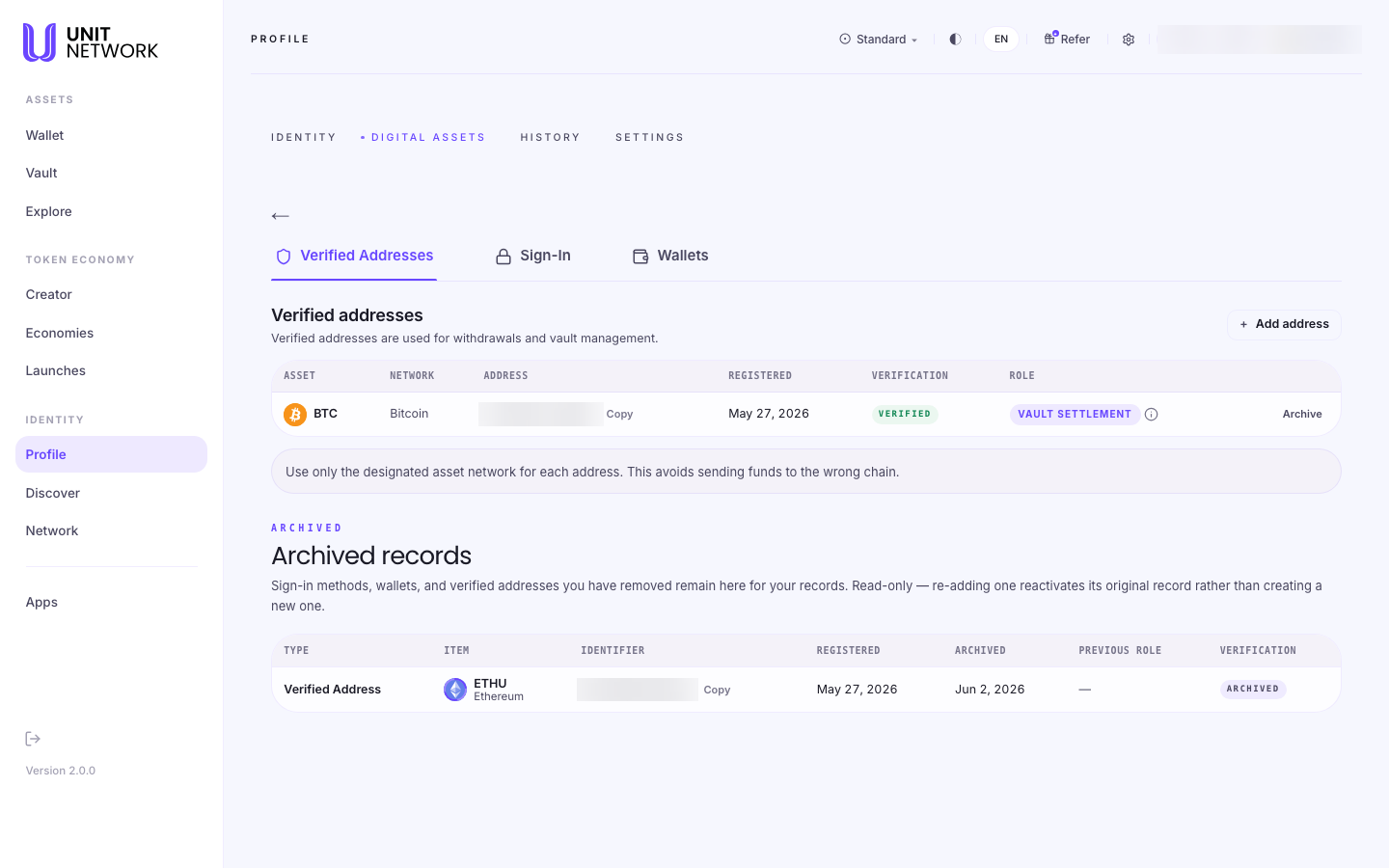
Outside addresses you have proved you control. The screen states what they are for: "Verified addresses are used for withdrawals and vault management."
"Use only the designated asset network for each address. This avoids sending funds to the wrong chain."
Each address is registered against one asset and one network. A Bitcoin address is for Bitcoin. Value sent to an address on the wrong chain is generally not recoverable by anyone, which is why the register pins the pairing rather than letting you choose at the moment of withdrawal.
The columns
- Asset and Network
- What the address is for. These are fixed per address.
- Address
- Shortened, with a Copy control.
- Registered
- When you added it.
- Verification
- VERIFIED once ownership is proved.
- Role
- What the address is used for — VAULT SETTLEMENT, for example, meaning it is where a vault settles to.
- Archive
- Removes it from active use. It is kept — see below.
Archived records
Beneath the register sits everything you have removed — "sign-in methods, wallets, and verified addresses you have removed remain here for your records."
It is read-only, and it behaves in a way worth knowing: "re-adding one reactivates its original record rather than creating a new one." An address you archive and later restore keeps its original registration date and history instead of appearing as something new.
Columns cover Type, Item, Identifier, Registered, Archived, Previous role and Verification — so you can see not just what was removed but what it had been used for.
Before You Begin
- The address itself, and certainty about which network it belongs to.
- Nothing to look. Reading the register changes nothing.
How to Use This Screen
Add a verified address
- Open Digital Assets from Profile or Apps.
- On Verified Addresses, select + Add address.
- Choose the asset and network, and check them twice.
- Enter the address.
- Complete verification so it shows as VERIFIED.
- Check the Role column reflects what you intend to use it for.
Retire an address
- Find it in the table.
- Check its Role first — archiving one used for vault settlement affects that vault.
- Select Archive.
- Confirm it appears under Archived records with its previous role.
What Happens Next
A verified address becomes selectable when you withdraw, and can be used for vault settlement. An archived address stops being offered but is never destroyed.
Tips
- Check the network before the address. The right address on the wrong chain is the expensive mistake this register exists to prevent.
- Read the Role column before archiving. An address doing vault settlement is load bearing.
- Archiving is reversible and keeps history — safer than it sounds.
- Add the address before you need it, not while withdrawing under time pressure.
Related Screens
- Sign-In · Wallets — the other two sections
- Withdraw — where verified addresses are used
- Vault — where settlement addresses matter
Frequently Asked Questions
- What is a verified address for?
- Withdrawals and vault management.
- Why is each address tied to one network?
- So value cannot be sent to the right address on the wrong chain — usually unrecoverable.
- Is archiving the same as deleting?
- No. Archived items are kept read-only, and re-adding one reactivates the original record.
- What does the Role column mean?
- What the address is used for — VAULT SETTLEMENT, for instance.
Troubleshooting
- My address is not offered when withdrawing
- Check it shows VERIFIED, and that its asset and network match.
- An address I removed is still listed
- Under Archived records — removal is recorded, not erased.
- I re-added an address and it kept its old date
- Expected. Re-adding reactivates the original record.