Your Public Profile
Overview
Your public profile is your page on UNIT. It shows who you are, what you have built, and how someone can connect with you.
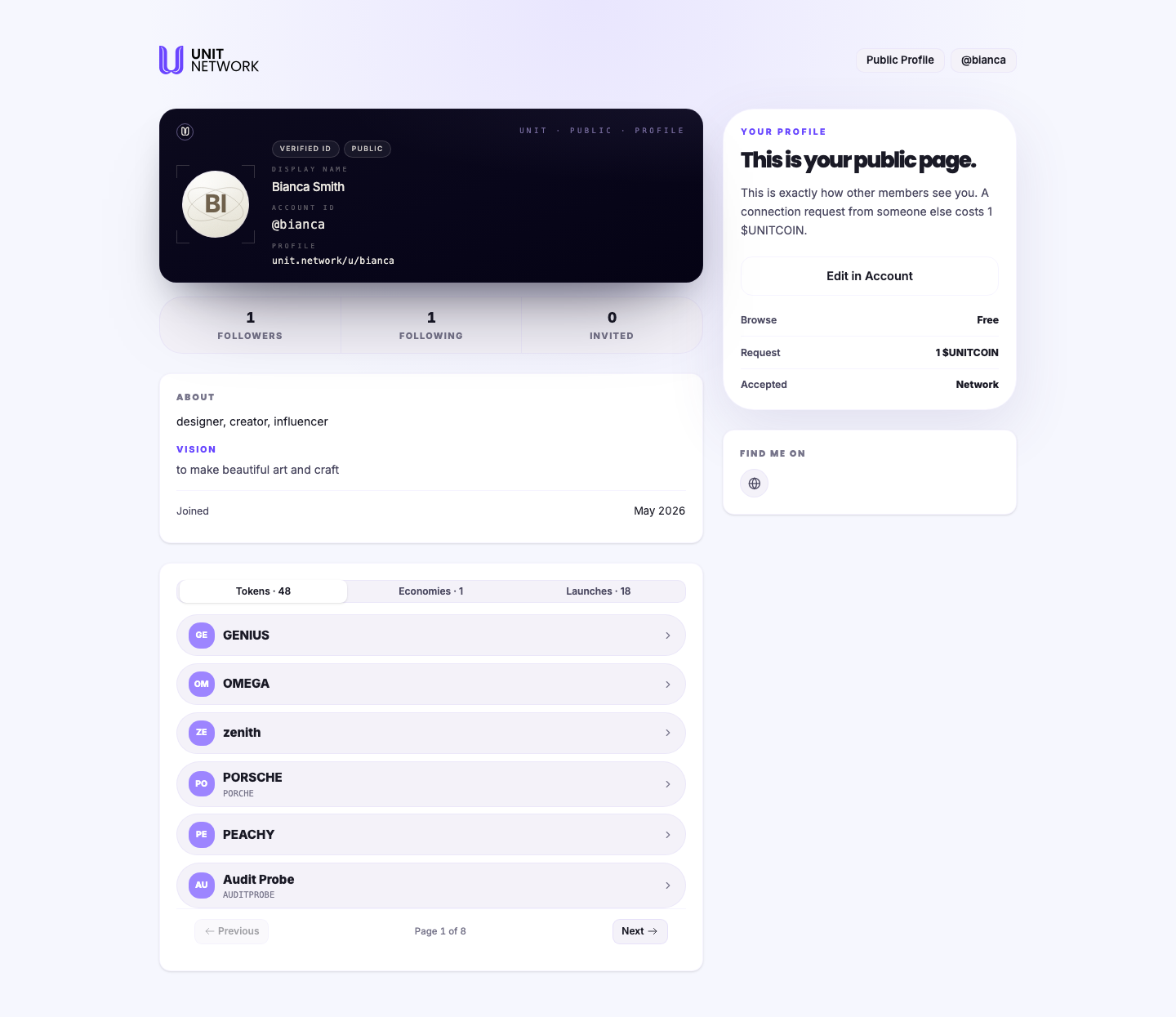
When you view your own, the page tells you so: "This is your public page. This is exactly how other members see you." — which makes it the reliable way to check how you come across.
What You Can See
- Identity card
- Your avatar, a Verified ID marker, your public display name, your account ID and your profile address.
- Followers · Following · Invited
- Your standing in the network: who follows you, who you follow, and how many people you have brought in.
- About and Vision
- Your bio and your goals, taken from Identity.
- Tokens · Economies · Launches
- What you have built, as counts, followed by a paged grid of your tokens. This is the part that shows what you actually do on UNIT.
- Connection options
- Three tiers: Browse is free, a connection request costs 1 UNITCOIN, and Accepted puts someone in your network. The cost is deliberate — it makes a request mean something.
- Find me on
- Your external links.
- Edit in Account
- Takes you back to Identity to change any of it.
Before You Begin
- A filled-in profile. This page displays what you set on Identity — it has nothing of its own to edit.
- Public Profile turned on, if you want others to be able to see it.
How to Use This Screen
Check how you appear
- Open your own profile URL, or select your profile from the menu.
- Read the page as a stranger would: does the bio explain what you do?
- Check Tokens, Economies and Launches — these are the credibility signals someone deciding whether to connect will look at.
- Page through your token grid to confirm what is on show.
- Select Edit in Account to change anything.
Share your profile
- Note the profile address on the card —
unit.network/u/<your handle>. - Share it. Anyone can browse it for free.
- Someone wanting to connect sends a request, which costs them 1 UNITCOIN.
What Happens Next
Nothing changes from this page — it is a display. Editing happens on Identity, and connections are handled through Network.
Tips
- Look at your own page before sharing it. It is the one place that shows exactly what others see.
- The token, economy and launch counts do more work than the bio — they show what you have actually built.
- Browsing is free; only a connection request costs anything. Sharing your profile widely costs you nothing.
- Add your external links. A profile with none gives a visitor nowhere to go.
Related Screens
- Your Identity — where everything on this page is set
- Discover — where other people find you
- Network — connections and standing
- Creator Portfolio — the tokens shown here
Frequently Asked Questions
- Can I edit anything on this page?
- No. It displays what you set on Identity. Use Edit in Account.
- Why does a connection request cost 1 UNITCOIN?
- Browsing is free; the small cost applies to requesting a connection, which makes a request a deliberate act.
- What does Verified ID mean?
- A marker on the identity card showing the account's identity has been verified.
- Why do the counts differ from what I see elsewhere?
- Different screens count different things — tokens created, economies operated, launches taken part in. Read each label carefully.
- Can I hide my profile?
- Yes. Turn off Public Profile in Discover Settings on Identity.
Troubleshooting
- My page shows no bio or vision
- Those come from your public profile fields on Identity. Fill them in there.
- Someone says they cannot open my profile
- Check Public Profile is on, and that you gave them the address exactly as shown on the card.
- My tokens are not all listed
- The grid is paged. Use the Previous and Next controls beneath it.