Identity
Overview
Identity is the first tab of the workspace and the public face of your economy. It holds the name, symbol, branding, description and official links — everything someone sees when they come across your token.
The screen puts it plainly: "Your Token is your presence in the Token Economy."
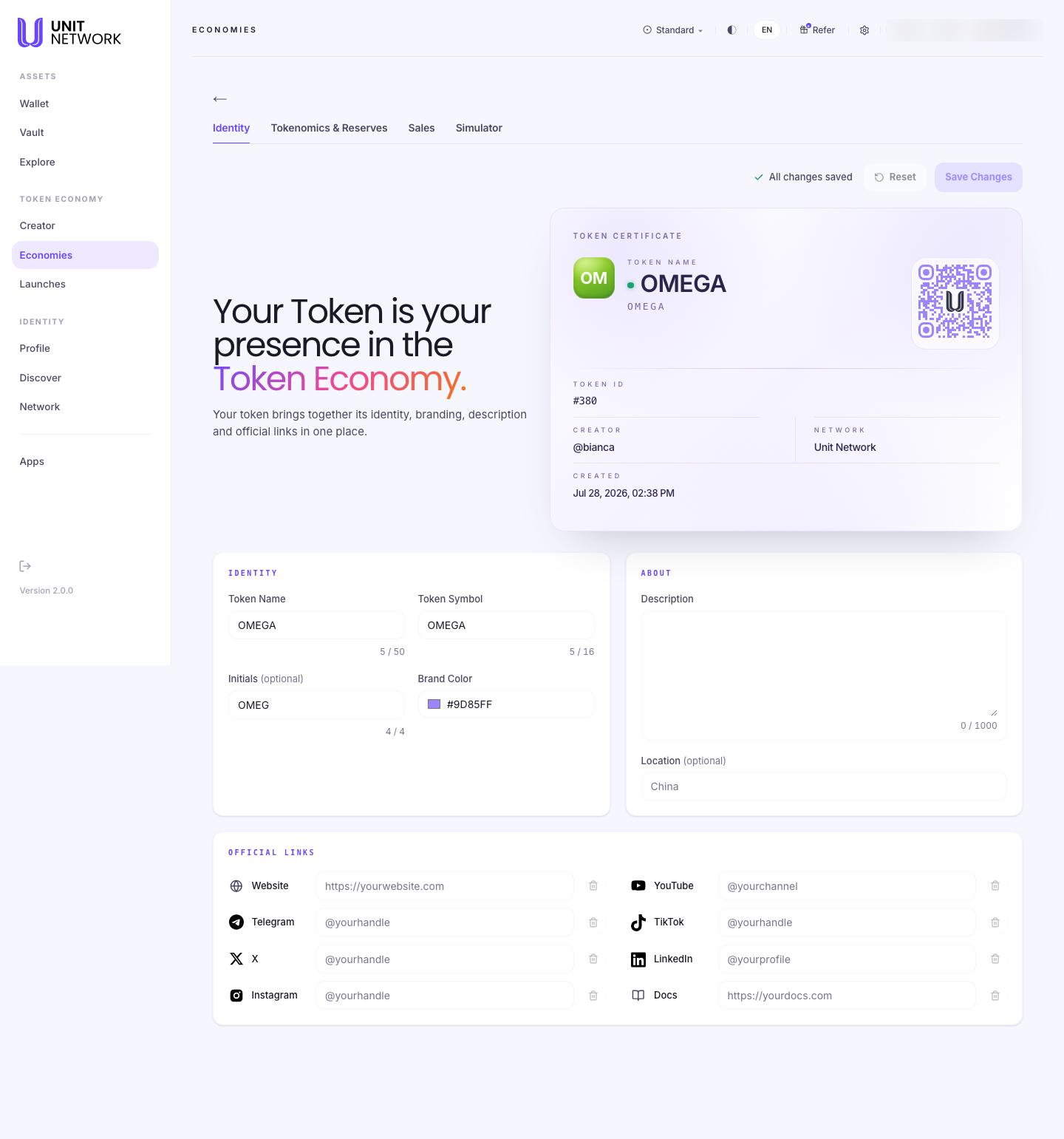
Open the economy from your Economy Portfolio and select the tab. Every workspace tab is reached that way — the workspace needs to know which token it is working on, and opening it from the portfolio is what tells it.
What You Can See
- Token Certificate
- A read-only record of the token: its name, symbol, token ID, creator, network and creation date. These are facts about the token rather than fields you edit.
- Identity
- Token Name (up to 50 characters) and Token Symbol (up to 16), plus optional Initials and a Brand Colour — the initials and colour are what appear on the token's card wherever it is listed.
- About
- A Description of up to 1,000 characters, and an optional Location. This is the text people read on your token's page.
- Official Links
- Website, Telegram, X, Instagram, YouTube, TikTok, LinkedIn and Docs. These establish that the economy is real and reachable.
- Save Changes and Reset
- Save commits your edits; Reset discards them. A note beside them tells you whether everything is saved.
Before You Begin
- A description — what the token is for, in plain language.
- Your links, if you have them. They can be added later.
- A brand colour and initials, if you want the card to look deliberate.
How to Use This Screen
- Open the economy from your portfolio. The workspace opens on Identity.
- Check the Token Certificate — confirm you are working on the right token by its token ID.
- Review the Token Name and Symbol. Both carry character counters.
- Set Initials and a Brand Colour so the token is recognisable in listings.
- Write the Description. This is what people read when deciding whether to take part.
- Add any Official Links you have.
- Select Save Changes. The note beside the button confirms the save.
What Happens Next
Saved identity appears wherever the token is shown — on its token page and in the Explore Markets listing.
With identity set, the next work is usually Tokenomics & Reserves.
Tips
- Write the description for someone who has never heard of your token. It is the one piece of text that has to do the explaining.
- Initials and a brand colour cost a minute and make the token recognisable in a list of hundreds.
- Links are trust signals. An economy with none looks unfinished.
- Use Reset rather than undoing edits by hand if you change your mind.
Related Screens
- Tokenomics & Reserves — the next tab
- The Token Page — where this identity appears
- Economy Portfolio — back to your economies
Frequently Asked Questions
- Can I change the token name after creation?
- Name and symbol are editable here. The token ID never changes.
- What are Initials for?
- The two-letter mark on the token's card in listings, where there is no room for a full name.
- How long can the description be?
- Up to 1,000 characters.
- Do I have to fill in every link?
- No. All are optional.
Troubleshooting
- The workspace says no economies were found
- Open the economy from your portfolio rather than by typing or bookmarking the address.
- My changes have not appeared on the token page
- Check the note beside Save Changes confirms the save.
- A field stops accepting characters
- You have hit the limit — 50 for the name, 16 for the symbol, 1,000 for the description.