Redeem
Overview
Redeem is the action that makes a treasury mean something. You give back some of a token and receive a share of what its treasury holds.
It runs through four stages, shown across the top of the screen: 1 Details, 2 Review, 3 Signing, 4 Completed — the same shape as Send and the other transaction screens.
The screen says it plainly: "Redemption is executed on-chain. Once confirmed, it cannot be reversed." Check the estimate at Review before you sign.
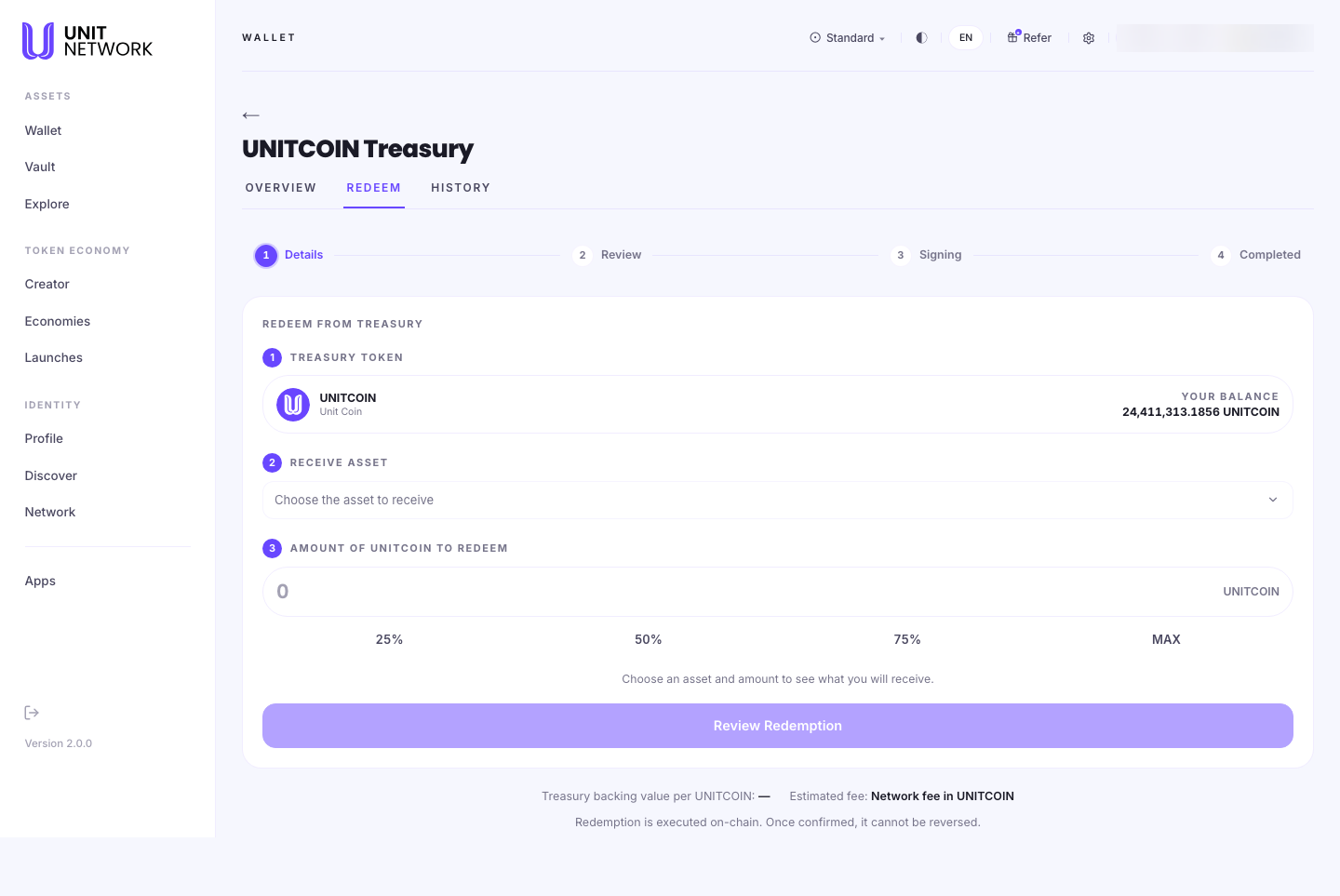
What You Can See
The three numbered steps
- 1 · Treasury token
- The token you are redeeming, with your balance of it beneath.
- 2 · Receive asset
- Which reserve asset you want back. The picker lists each with its treasury available figure, so you can see what there is to draw on before choosing.
- 3 · Amount
- How much to redeem, with 25%, 50%, 75% and MAX shortcuts.
The estimate
Until you have chosen both, the screen says "Choose an asset and amount to see what you will receive." Once you have, it shows what you would receive — marked (estimated).
Treasury backing value
Beneath the button sits the figure the whole screen turns on: treasury backing value per token. It is the reserve divided across the supply — what one token is entitled to, and the rate your redemption settles at.
Fee
A network fee, charged in the treasury token. It is an estimate until you reach Review.
Before You Begin
- A balance of the token you want to redeem.
- A look at the overview first, so you know what the reserve actually holds.
- Enough left for the fee, which is charged in the same token.
- Acceptance that it is final. There is no undo once signed.
How to Use This Screen
Redeem tokens for a reserve asset
- Open the token's treasury and select REDEEM.
- Check your balance under step 1.
- Under RECEIVE ASSET, choose what you want back. Note each option's treasury available figure — you cannot draw more than the treasury holds.
- Enter an amount, or use 25%, 50%, 75% or MAX.
- Read the estimate of what you will receive.
- Select Review Redemption and check the figures.
- Sign. Watch the stage bar move through Signing to Completed.
Check what a token is worth redeeming before committing
- Open REDEEM and choose an asset and a small amount.
- Read treasury backing value per token. That is the rate you are redeeming at.
- Compare it with what the token trades at on Acquire. Selling and redeeming are different routes out, and they do not always give the same result.
- Leave the screen if you would rather not proceed. Nothing is committed before signing.
What Happens Next
Signing sends the redemption to the chain. On Completed, the reserve asset is in your wallet and the treasury's reserve is smaller by that amount.
The redemption is recorded on Treasury History, where it can be filtered under Redeem.
Tips
- Read the backing value before the amount. It tells you what you are getting per token, which is the only figure that decides whether this is worth doing.
- Check treasury available for your chosen asset. A large redemption into a thin reserve asset is limited by what is actually there.
- Compare redeeming with selling. Redeeming draws on the reserve; selling goes through the market. They are different prices.
- Use a small amount first to see the numbers before committing to MAX.
- Leave enough of the token to cover the fee.
Related Screens
- Treasury Overview — what the reserve holds
- Treasury History — where your redemption is recorded
- Acquire — the market route, for comparison
- Wallet Overview — where the asset arrives
Frequently Asked Questions
- What am I actually doing when I redeem?
- Giving back some of a token in exchange for a share of the assets its treasury holds.
- Can I choose which asset I get back?
- Yes — that is step 2. Each option shows how much the treasury has available.
- Is redeeming the same as selling?
- No. Redeeming draws on the reserve at the backing value. Selling goes through the market at whatever it will bear.
- Can I undo a redemption?
- No. "Once confirmed, it cannot be reversed."
- What does "estimated" mean on the amount I will receive?
- The final figure is settled when the chain executes it. Review shows you the numbers before you sign.
Troubleshooting
- My estimate looks too small
- Check the backing value per token — that is the rate you are redeeming at. Try a larger amount to see how it scales.
- Review Redemption will not proceed
- Check you have chosen both an asset and an amount, and that the amount is within your balance.
- I cannot see my asset in the picker
- The picker lists only what this treasury holds. If it is not there, the reserve does not contain it.