Invitation
Overview
You cannot sign yourself up for UNIT. The invitation screen states the rule in one line — "Unit is invited, not signed up for." — and asks for the username of the member who recommended you.
There are two ways in. If somebody sent you a link, it already carries their username and you land on their invitation directly. If they just told you their handle, you type it in yourself.
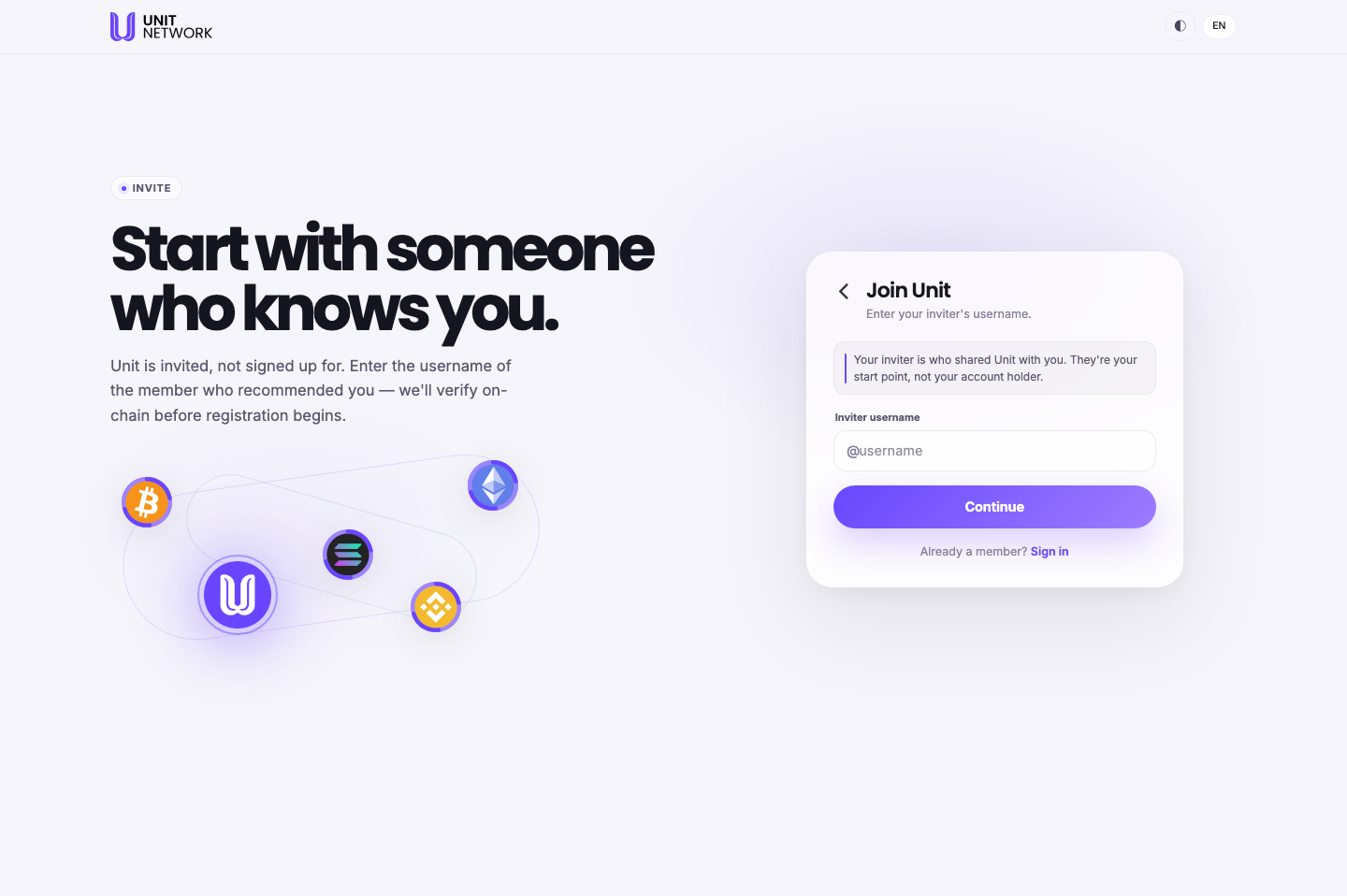
What You Can See
- Inviter username
- One field, prefixed with @. Type the handle without the @ — the screen supplies it.
- "They're your start point, not your account holder"
- Worth reading carefully. Naming someone as your inviter does not put them in charge of your account, and does not give them access to it. It records who brought you in.
- "We'll verify on-chain before registration begins"
- The username is checked against the network before you go any further, so a handle that does not exist will not let you continue.
- Already a member? Sign in
- The way out if you landed here by mistake.
The invitation itself
Once the inviter is known — whether you typed it or arrived by link — you see their invitation.
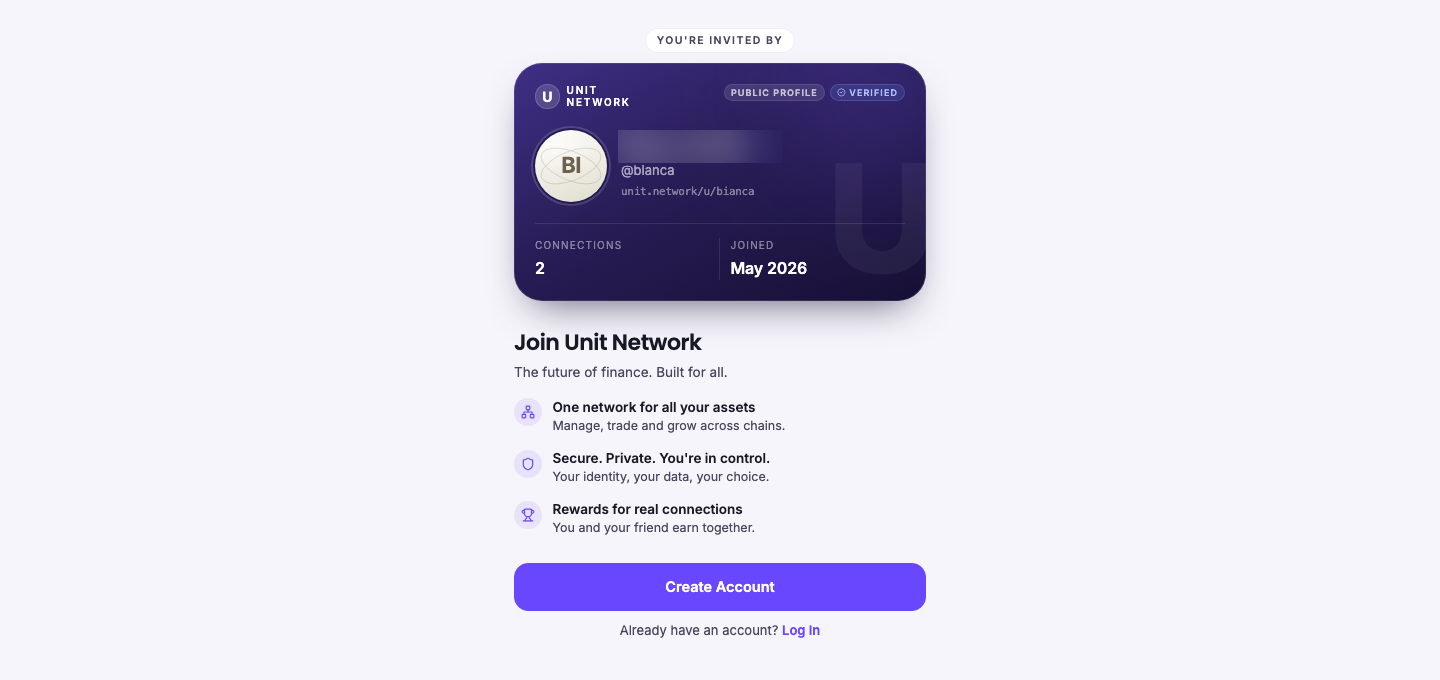
- The inviter card
- Their avatar, name and handle, their public address, how many connections they have and when they joined — with PUBLIC PROFILE and VERIFIED badges. You can see who is inviting you before you accept.
- The three promises
- What UNIT says it offers: one network for all your assets, control of your own identity and data, and "rewards for real connections — you and your friend earn together".
- Create Account
- Continues to registration, carrying the inviter with you.
Before You Begin
- An inviter. Either their link or their username. Without one you cannot register.
- Nothing else. No email, no wallet, no funds — those come at the next step.
How to Use This Screen
If somebody sent you a link
- Open the link. It carries their username, so you land on their invitation directly.
- Check the card — the name, handle and badges tell you who is inviting you.
- Select Create Account.
If you only know their handle
- Go to the invite screen.
- Type their username in the Inviter username field, without the @.
- Select Continue. The username is verified against the network.
- Their invitation appears. Select Create Account.
What Happens Next
You continue to Create Your Account, which shows an INVITED BY badge carrying your inviter's handle. The connection is recorded from that point on.
The invitation page mentions that you and your inviter earn together. Recorded rewards appear in Network once you are a member.
Tips
- Read the card before accepting. It is there so you can see who is bringing you in.
- Type the handle without the @ — the field already shows one.
- Your inviter has no control over your account. If that was the worry, it is not one.
- If the handle will not verify, ask your inviter to send their link instead — it carries the username for you.
Related Screens
- Create Your Account — the next step
- Sign In — if you already have an account
- Your Network — where you invite others once you are in
Frequently Asked Questions
- Can I join without an invitation?
- No. The screen is explicit: "Unit is invited, not signed up for."
- Does my inviter control my account?
- No. The screen says they are "your start point, not your account holder".
- Can I change my inviter later?
- The inviter is recorded at registration. Nothing on these screens offers to change it afterwards.
- What does "verify on-chain" mean here?
- The username is checked against the network rather than a list held by the website, so a handle that does not exist cannot be used.
- Do I get anything for being invited?
- The invitation page says "you and your friend earn together". What has actually been recorded shows in Network.
Troubleshooting
- The username will not verify
- Check the spelling, and leave out the @. If it still fails, ask your inviter for their invitation link.
- I do not know anybody on UNIT
- Then you cannot register yet. The invitation screen offers "Just looking?" browsing on the sign-in screen instead — you can look without an account.
- I already have an account and landed here
- Select Sign in at the foot of the screen.