Discover
Overview
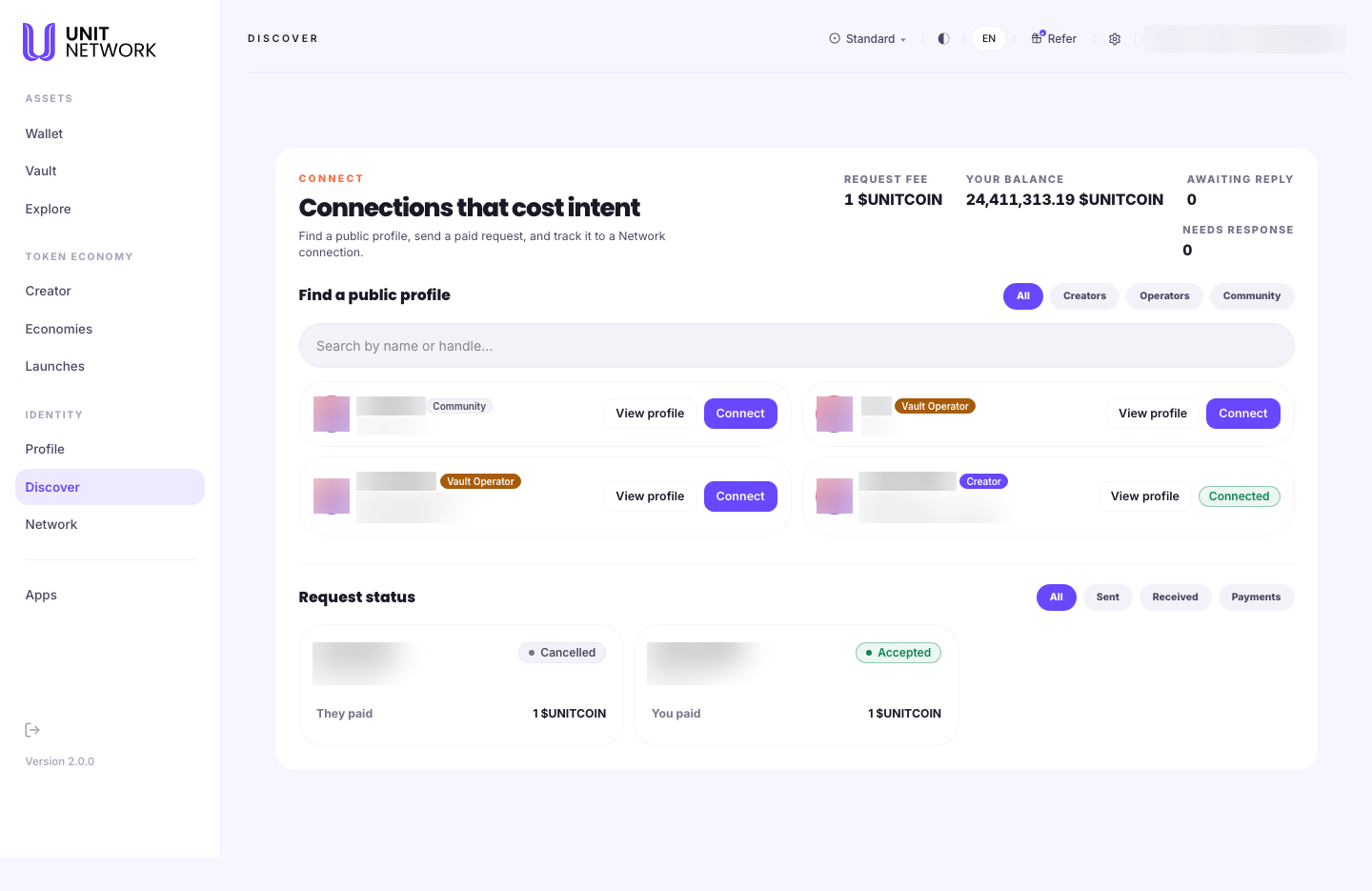
Discover is how you find other people on UNIT and ask to connect with them. Browsing is free; sending a connection request costs 1 UNITCOIN.
That small cost is the whole idea, and the screen names it: "Connections that cost intent." A request you have to pay for is a request you meant to send — which is what stops a network filling up with noise.
What You Can See
The four figures
- Request Fee
- What it costs you to send one connection request — 1 UNITCOIN.
- Your Balance
- Your UNITCOIN, so you can see what you have to spend on requests.
- Awaiting Reply
- Requests you have sent that nobody has answered yet.
- Needs Response
- Requests you have received and not yet answered. Worth checking — somebody paid to send each one.
Find a public profile
- Search
- By name or handle.
- All · Creators · Operators · Community
- Filters by what someone does on UNIT. Creators have issued tokens, Operators run vaults, Community is everyone else.
- Profile cards
- Each shows a person's name, handle, role badge and a line about themselves, with two controls: View profile to read their page, and Connect to send a request. A card you are already connected to reads Connected instead.
Request status
- All · Sent · Received · Payments
- Four views of your requests. Payments is the money view — what each request cost and who paid it.
- Request cards
- Each shows the person, the outcome — Accepted, Cancelled — and who paid. "You paid 1 UNITCOIN" on a request you sent; "They paid 1 UNITCOIN" on one you received.
Before You Begin
- A UNITCOIN balance — 1 per request. The screen shows yours.
- A public profile of your own, ideally. People decide whether to accept based on what they can see — see Your Public Profile.
- Nothing at all to browse. Looking is free.
How to Use This Screen
Find someone
- Select Discover from the menu.
- Use the search field if you know a name or handle.
- Otherwise filter by Creators, Operators or Community depending on who you are looking for.
- Read the cards — the role badge and the line beneath the handle tell you what each person does.
- Select View profile to read someone's full page before deciding.
Send a connection request
- Check your balance covers the 1 UNITCOIN fee.
- Select View profile first — it costs nothing and tells you whether the request is worth making.
- Select Connect on their card.
- Confirm and sign. The fee is charged when you send, not when they answer.
- Your Awaiting Reply count goes up, and the request appears under Sent.
Answer a request someone sent you
- Check Needs Response. If it is above zero, somebody is waiting.
- Select Received under Request status.
- Open the requester's profile to see who they are.
- Accept or decline. An accepted request becomes a connection in Network.
What Happens Next
A sent request sits in Awaiting Reply until the other person answers. Accepted, it becomes a connection and shows in Network.
The 1 UNITCOIN is charged for sending the request. Request status records what happened to each one and who paid, so there is always a record.
Tips
- View the profile before connecting. Browsing is free and the request is not — a moment's reading saves the fee.
- Check Needs Response. Every request there cost somebody 1 UNITCOIN to send.
- The role filters are the fastest way to find the right kind of person — an operator if you need a vault settled, a creator if you are interested in their token.
- Fill in your own profile first. People decide from what they can see.
- Use Payments if you want to see what your connecting has cost overall.
Related Screens
- Your Public Profile — what people see when they find you
- Your Identity — where you turn discoverability on and off
- Network — where accepted connections live
- Wallet Overview — the balance the fee comes from
Frequently Asked Questions
- Why does connecting cost anything?
- So a request means something. Browsing and viewing profiles are free; only sending a request costs, and the screen calls this "connections that cost intent".
- Do I get the UNITCOIN back if they decline?
- The fee is charged for sending the request. Check Payments under Request status for the record of each one.
- What do the role badges mean?
- Creator has issued tokens, Vault Operator runs vaults, and Community is everyone else.
- Why can I not find someone?
- They may not be discoverable. Each person controls that on their own identity settings.
- How do I appear here myself?
- Turn on Discoverable in your identity settings.
Troubleshooting
- Nobody appears in the list
- Clear the search field and set the filter to All — the two combine.
- Connect is unavailable
- Check your UNITCOIN balance covers the fee. If the card already reads Connected, you are connected to that person.
- My request has had no reply
- It stays in Awaiting Reply until they answer. There is no way to hurry it.
- Someone says they cannot find me
- Check Discoverable is on in your identity settings.