Acquire
Overview
Acquire creates new units of a stablecoin by committing collateral you already hold. You hand over a wrapped asset — BTCU, say — and receive the stablecoin, backed by what you committed.
It is one of three ways to obtain an asset on UNIT, and the one for wrapped fiat. Buy pays with a card; Swap trades on a market; Acquire issues against collateral.
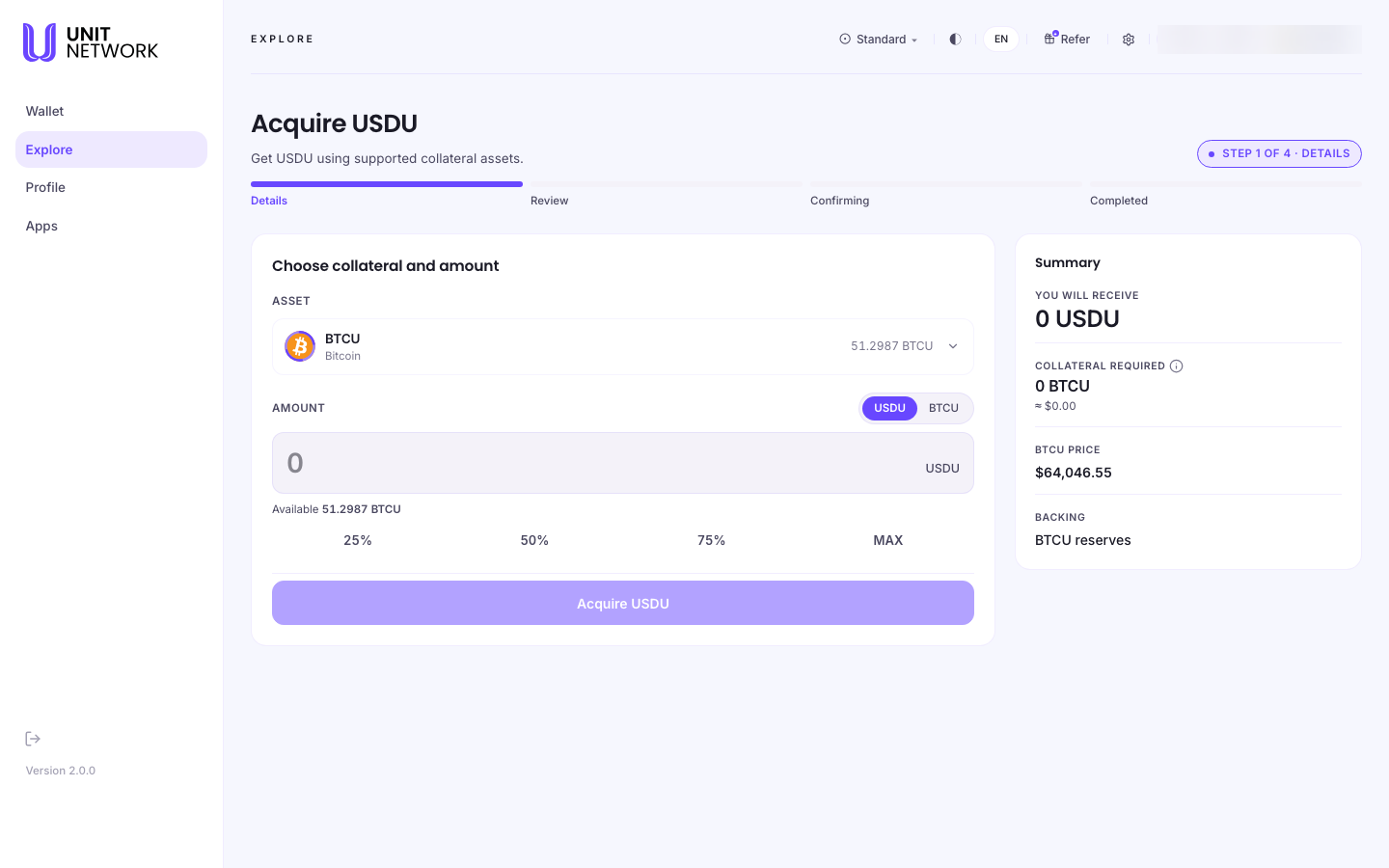
What You Can See
- The heading
- Names what you are acquiring, and states that it is obtained using supported collateral assets.
- Stage bar
- Details, Review, Confirming and Completed, with a step counter.
- Asset
- The collateral being committed, with your balance of it.
- Amount
- Two toggles let you enter the figure either as the stablecoin you will receive or as the collateral you will spend, with 25%, 50%, 75% and MAX against your available balance.
- Summary
- You will receive, Collateral required, the collateral's current price, and what the new units are backed by. It updates as you change the amount.
Before You Begin
- A supported collateral asset with a balance — the screen names it and shows how much you have.
- The amount, in whichever direction you are thinking.
- A signing account connected.
How to Use This Screen
- Open the stablecoin from Explore Markets — filter to Stablecoin to find one.
- On the token page, check it reads Mint Enabled, then select the primary action Acquire.
- Check the Asset panel — this is the collateral that will be committed.
- Decide which way round to enter the amount, and select the matching toggle.
- Enter the Amount, or use 25%, 50%, 75% or MAX.
- Read the Summary: You will receive against Collateral required. Check the implied rate is one you accept.
- Select Acquire to move to Review, where it is summarised before signing.
- Sign. The screen moves to Confirming, then Completed.
What Happens Next
The stablecoin appears in your balances on the Wallet Overview, and the collateral leaves them. The acquisition carries a reference you can find again in History.
Tips
- Read the summary before committing. It is the only place the exchange is shown in both directions.
- Enter the amount in the direction you are actually thinking — how much you want, or how much you are willing to spend.
- The collateral price drives the amount required, so a moving price moves the figure.
- Acquiring is not buying. To pay with a card use Buy; to trade on a market use the token's Swap.
Related Screens
- The Token Page — where Acquire starts
- Explore Markets — finding a stablecoin
- Buy — acquiring with a card instead
- Wallet Overview — where the stablecoin appears
Frequently Asked Questions
- How is this different from buying or swapping?
- Buying pays with a card. Swapping trades on a market. Acquiring issues new units against collateral you commit.
- Do I get my collateral back?
- No. It becomes the backing for what you acquired. It is an exchange, not a deposit.
- Which assets can be used as collateral?
- The screen names the supported asset and shows your balance of it.
- Why does the collateral required keep changing?
- It is calculated from the collateral's current price, which moves.
- Can every stablecoin be acquired?
- Only where the token page reads Mint Enabled.
Troubleshooting
- The screen says it could not check availability
- The check did not complete. Wait a moment and reload before entering an amount — the summary depends on it.
- The action is unavailable
- Check an amount has been entered and that it is within your collateral balance.
- The summary shows zeroes
- No amount has been entered yet; it fills in as you type.
- I do not have enough collateral
- Use a smaller amount, or bring more in first — see Deposit.