Launches
Overview
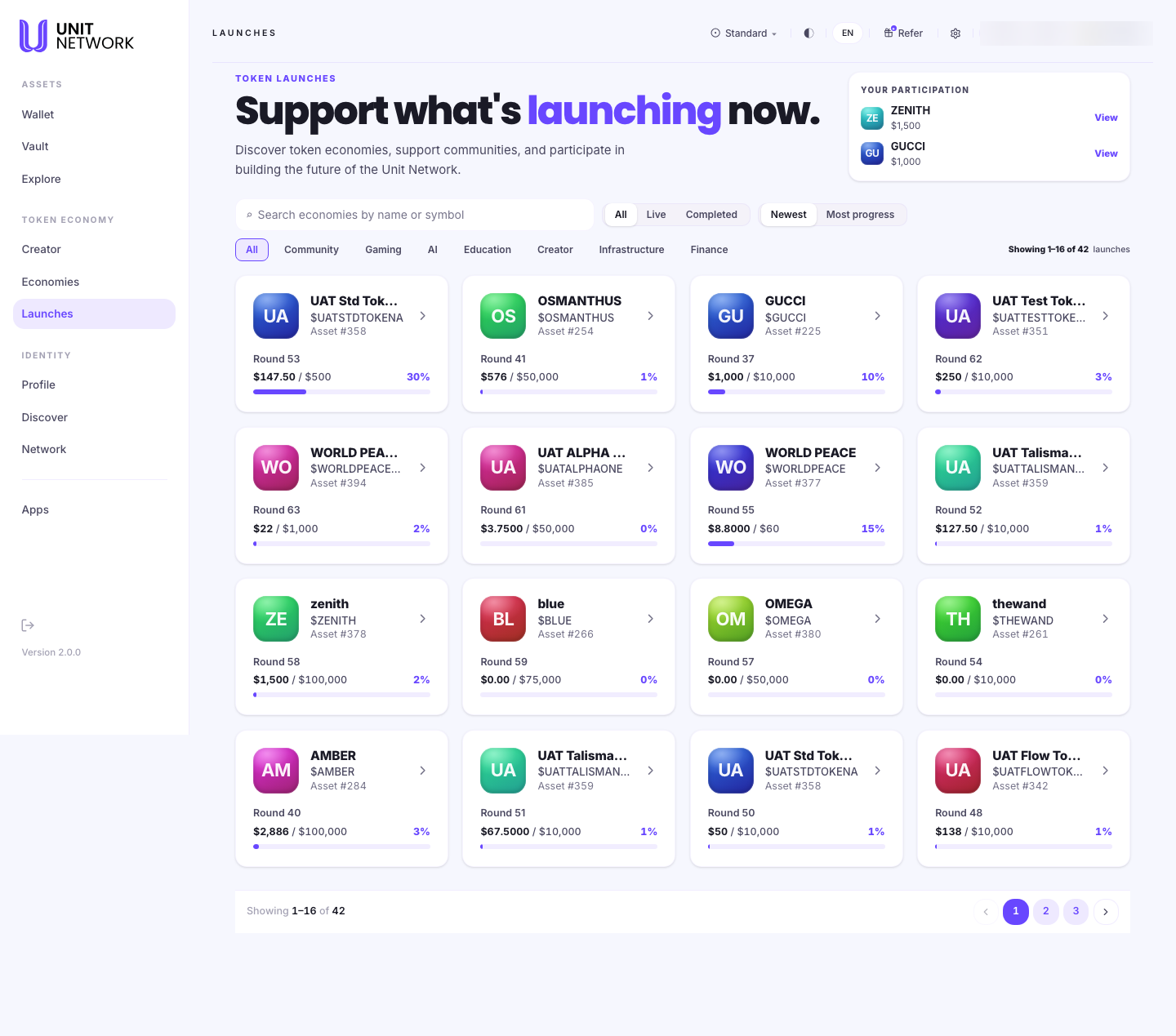
Launches is where economies open up to people. Each one is a round: a token offering a set amount at a set price, with a target to reach. This screen shows what is raising now, how far each has got, and what you have already taken part in.
It leads with your participation rather than the catalogue — what you have backed comes first, then everything else.
What You Can See
- Your Participation
- The launches you have contributed to, with how much you put in. This sits above the catalogue because what you have backed matters more to you than what is available.
- Search
- Filters by economy name or symbol.
- All · Live · Completed
- Whether a round is still open or has finished.
- Newest · Most progress
- Sort order. Most progress surfaces rounds closest to their target.
- Categories
- Community, Gaming, AI, Education, Creator, Infrastructure and Finance — what the economy is for, rather than what kind of token it is.
- Launch cards
- Each shows the economy, its asset number, its round number, the amount raised against the target, and the percentage filled. The round number matters: an economy can run several rounds, and each is a separate launch.
Before You Begin
- A balance to contribute with. Contributions are made in UNITCOIN.
- An idea of what you are looking for — the category filters are the fastest way in.
- Nothing at all to browse.
How to Use This Screen
Find a launch to support
- Select Launches from the menu.
- Select Live to hide rounds that have already finished.
- Pick a category if you have a particular interest.
- Sort by Most progress to see what is closest to its target, or Newest for what has just opened.
- Read each card's raised-against-target figure and percentage.
- Select a card to open the launch.
Check what you have backed
- Read the Your Participation row at the top.
- Note the amount shown against each.
- Select View to open that launch and see your position.
What Happens Next
Selecting a launch opens its own page, where you can read the round in detail and contribute.
Tips
- A low percentage is not a verdict. A round at 1% may have just opened; check how much time is left on the launch itself.
- The round number tells you whether an economy has raised before. A round 41 is a different proposition from a round 1.
- Use Completed to see how an economy's earlier rounds went before backing its current one.
- Your Participation is the quickest way back to something you have already backed.
Related Screens
- A Launch — the round in detail, and where you contribute
- Sales — where an owner creates the round
- The Token Page — the token behind a launch
- Wallet Overview — the balance you contribute from
Frequently Asked Questions
- What is a round?
- One offering by an economy: a quantity of its token at a set price, with a target. An economy can run several rounds over time.
- What do the categories mean?
- What the economy is about — Community, Gaming, AI, Education, Creator, Infrastructure or Finance. They describe purpose, not token type.
- What do I contribute with?
- UNITCOIN. The amount is entered in dollars and paid from your UNITCOIN balance.
- Can I take part in a completed round?
- No. Completed rounds are shown so you can see an economy's history.
Troubleshooting
- A launch I was looking at has gone
- Check the All filter — it may have completed and dropped out of the Live view.
- My participation is not listed
- The row shows launches you have contributed to. If a contribution has not settled yet, open the launch itself and check your position there.
- Nothing matches my filters
- Reset the category to All and clear the search — the filters combine.