Create a Token
Overview
Creating a token on UNIT takes two pieces of information: a name and a symbol. That is the whole form. The screen says as much — "Start something in 30 seconds" — and it means it.
Everything you might expect to decide up front — treasury, governance, supply, launch settings — comes after the token exists. The screen states this too: "No tokenomics required. You can configure treasury, governance, and launch settings after creation."
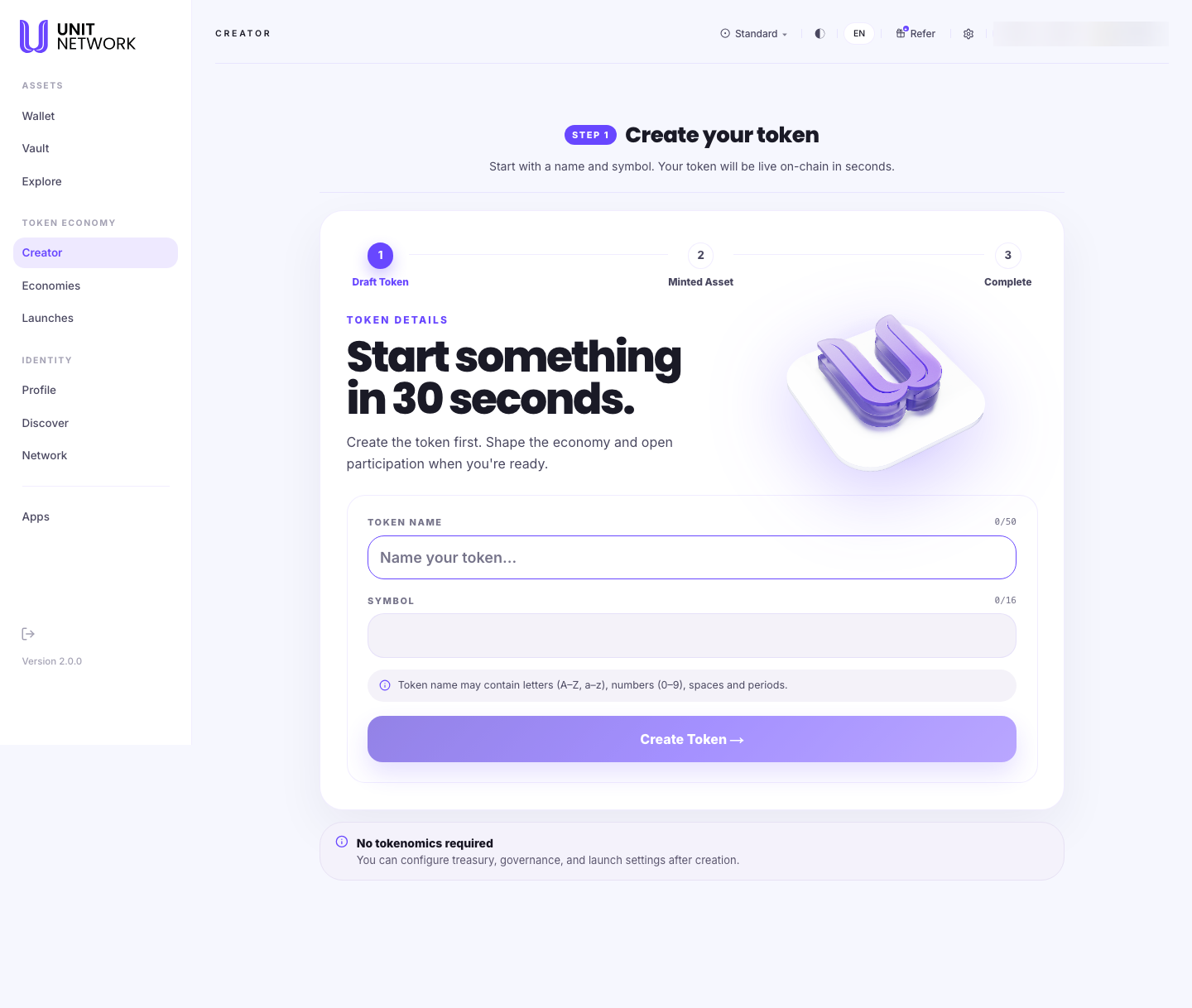
What You Can See
- The three steps
- Draft Token, Minted Asset, Complete. You fill in the first; the other two happen as the token is created on-chain.
- Token Name
- Up to 50 characters, with a live counter. The note beneath sets out what is allowed: letters, numbers, spaces and periods.
- Symbol
- Up to 16 characters, with its own counter. This is the short ticker your token is
known by — the
$OMEGApart. - Create Token
- The single action. There is nothing else to fill in.
- The closing note
- A reminder that no tokenomics are required now, and that treasury, governance and launch settings are configured after creation.
Before You Begin
- A name, up to 50 characters, using letters, numbers, spaces and periods.
- A symbol, up to 16 characters. Short and memorable works best — it is what appears in listings and on your token's page.
- A signing account connected, since creating a token writes to the chain.
- Nothing else. Supply, treasury and governance are decided later.
How to Use This Screen
- Open Creator from the menu.
- Select Create New Token.
- Enter the Token Name. Watch the counter — 50 characters is the limit, and the note beneath tells you which characters are allowed.
- Enter the Symbol, up to 16 characters.
- Read both back. The name and symbol are how your token is identified from here on.
- Select Create Token and sign.
- The token is minted on-chain and the steps advance through Minted Asset to Complete.
What Happens Next
Your token exists on-chain and is given an asset number — its permanent identifier. It appears in your Creator Portfolio and in the public catalogue on Explore Markets, under the Creator category.
Creator's job is now finished. To shape the token — its identity and branding, its supply and reserves, its sales — open it from your portfolio, which takes you to its economy workspace.
Tips
- Choose the symbol carefully. It is the short name your token carries everywhere — in listings, on its page, and in every transfer.
- Do not hold back waiting to decide tokenomics. The screen is explicit that none is required, and deciding later is the intended path.
- A token with no market yet is normal — a new token has no liquidity pool until someone creates one.
- Names can repeat across UNIT. The asset number is what makes yours unique.
Related Screens
- Creator Portfolio — where creation starts and the token lands
- Economies — where the token is shaped after creation
- Explore Markets — where it appears publicly
- The Token Page — what your token's page will look like
Frequently Asked Questions
- Do I need to decide the supply now?
- No. The screen says so plainly: no tokenomics are required at creation. Supply, treasury and governance are configured afterwards.
- How long does it take?
- The screen says your token will be live on-chain in seconds, and the form asks for two fields.
- What characters can the name use?
- Letters, numbers, spaces and periods, up to 50 characters. The symbol allows up to 16.
- Can I change the name or symbol later?
- A token's identity is edited in its economy workspace, on the Identity tab.
- Will anyone be able to buy it straight away?
- Not until a market exists for it. A newly created token has no liquidity pool.
Troubleshooting
- The name is rejected
- Check the note beneath the field — only letters, numbers, spaces and periods are allowed, and the limit is 50 characters.
- The counter has stopped increasing
- You have reached the limit — 50 for the name, 16 for the symbol.
- Create Token does nothing
- Both fields must be filled in, and a signing account must be connected.
- My token is not in the portfolio yet
- Wait for the steps to reach Complete. The portfolio updates once the token is minted on-chain.