My Vaults
Overview
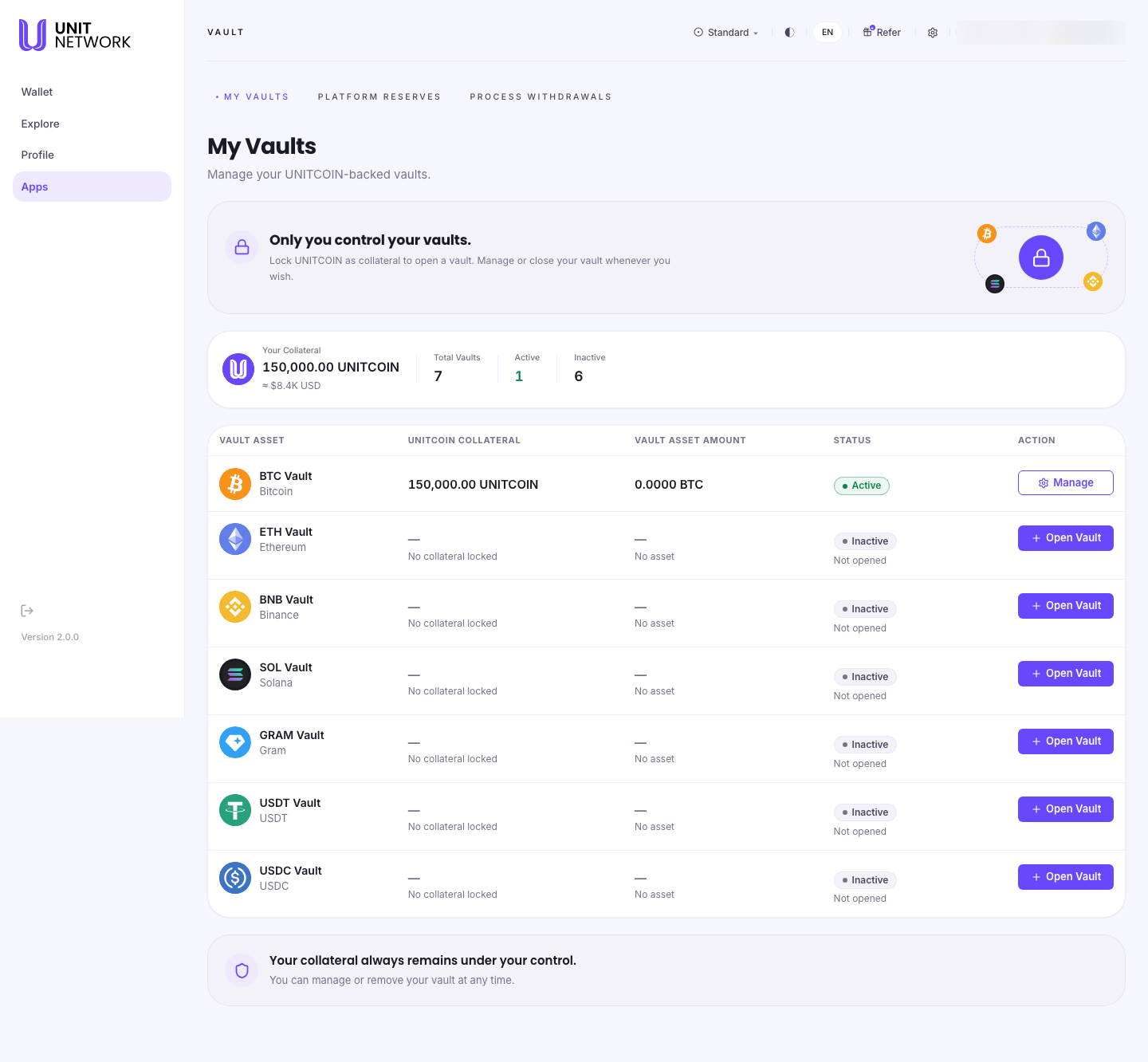
My Vaults is the Vault landing page. It shows what you have committed as collateral, which of your vaults are open, and what each one currently holds — and it is where you open a new vault or manage an existing one.
One vault covers one asset. A Bitcoin vault settles BTC, an Ethereum vault settles ETH, and so on, so the list is organised by asset market. Every supported market is listed on this page; there is nowhere else to browse them.
What You Can See
The three Vault tabs
The Vault module has exactly three destinations, and they sit across the top of every Vault page:
- My Vaults
- This page — your own vaults and every market you could open one for.
- Platform Reserves
- How every vault market on UNIT is backed.
- Process Withdrawals
- The queue of withdrawal requests waiting to be handled.
Your summary
- Your Collateral
- The total UNITCOIN you have committed across all your vaults, with an approximate value beneath.
- Total Vaults, Active and Inactive
- How many markets you could operate, how many you have opened, and how many you have not. Inactive means you have not opened one — not that anything is wrong.
The vault table
- Vault Asset
- The asset each vault settles, with its network beneath.
- UNITCOIN Collateral
- What you have committed to that vault. An unopened vault reads "No collateral locked".
- Vault Asset Amount
- What the vault currently holds and is responsible for settling. This is the figure that decides whether your collateral can be withdrawn.
- Status
- Active for a vault you have opened, Inactive for one you have not.
- Action
- Manage on a vault you operate, Open Vault on one you do not. Both lead to the same place — that vault's own page.
Before You Begin
- Nothing, to read this page.
- To open a vault you need a verified settlement address for the asset, added in Digital Assets, and UNITCOIN to commit.
How to Use This Screen
Check what you have committed
- Read Your Collateral for the total across every vault.
- Read Active for how many vaults that total is spread across.
- Read each row's UNITCOIN Collateral to see where it sits.
Check whether your collateral is free
- Find the vault in the table.
- Read its Vault Asset Amount.
- If it is zero, that vault's collateral can be withdrawn.
- If it is above zero, settle the outstanding amount first — see Open or Add to a Vault.
Open or manage a vault
- Find the asset you want in the table.
- Select Open Vault on an inactive row, or Manage on an active one.
- The vault's own page opens, with Add, Withdraw and Settle tabs. What you see first depends on whether the vault is already open — see Open or Add to a Vault.
What Happens Next
Both actions lead to the same vault page. From there you register the settlement address if the vault is new, add collateral, withdraw it once nothing is outstanding, or settle the vault's asset.
Every vault page has a ← My Vaults link back to this table.
Tips
- Read the Vault Asset Amount before planning to withdraw collateral. It is the single thing that governs whether the collateral is free.
- Inactive rows are an invitation, not a problem. You only need a vault for an asset you intend to settle.
- Collateral committed to a vault is not spendable from your wallet. Commit what you can leave in place.
Related Screens
- Open or Add to a Vault — the vault page itself
- Platform Reserves — backing across the whole platform
- Process Withdrawals — the withdrawal queue
- Digital Assets — where settlement addresses are verified
- Wallet Overview — where your UNITCOIN comes from
Frequently Asked Questions
- Why do I have seven vaults when I only opened one?
- You have not. The table lists every asset market you could operate a vault for. Six are Inactive because you have not opened them.
- What is the Vault Asset Amount?
- What the vault currently holds and is responsible for settling. It rises when an asset arrives at the vault's settlement address, and falls as you settle it.
- Can I have two vaults for the same asset?
- No. One vault covers one asset for your account.
- Is my collateral still mine?
- Yes. The page says so in as many words: your collateral always remains under your control. It is committed, not given away.
- Where do I browse available vault markets?
- Here. Every supported market is on this page — there is no separate directory.
Troubleshooting
- A vault I opened still shows as Inactive
- A vault becomes Active once its settlement address is registered on-chain. Open the vault and check the Add tab — if it is asking you to register an address, that step did not complete.
- My collateral total looks wrong
- The total covers every vault. Add up the UNITCOIN Collateral column to see how it is distributed.
- A figure shows a dash
- A dash means there is nothing to show. UNIT shows a dash rather than a zero it cannot stand behind.