A Launch
Overview
A launch page is one round of one economy. It shows how much has been raised against the target, what you have already put in, and it is where you contribute.
The page explains the mechanics plainly: contributions are pooled toward the target, and allocations are finalised pro-rata at settlement. You are not buying at a counter — you are joining a pool, and what you receive is worked out when the round settles.
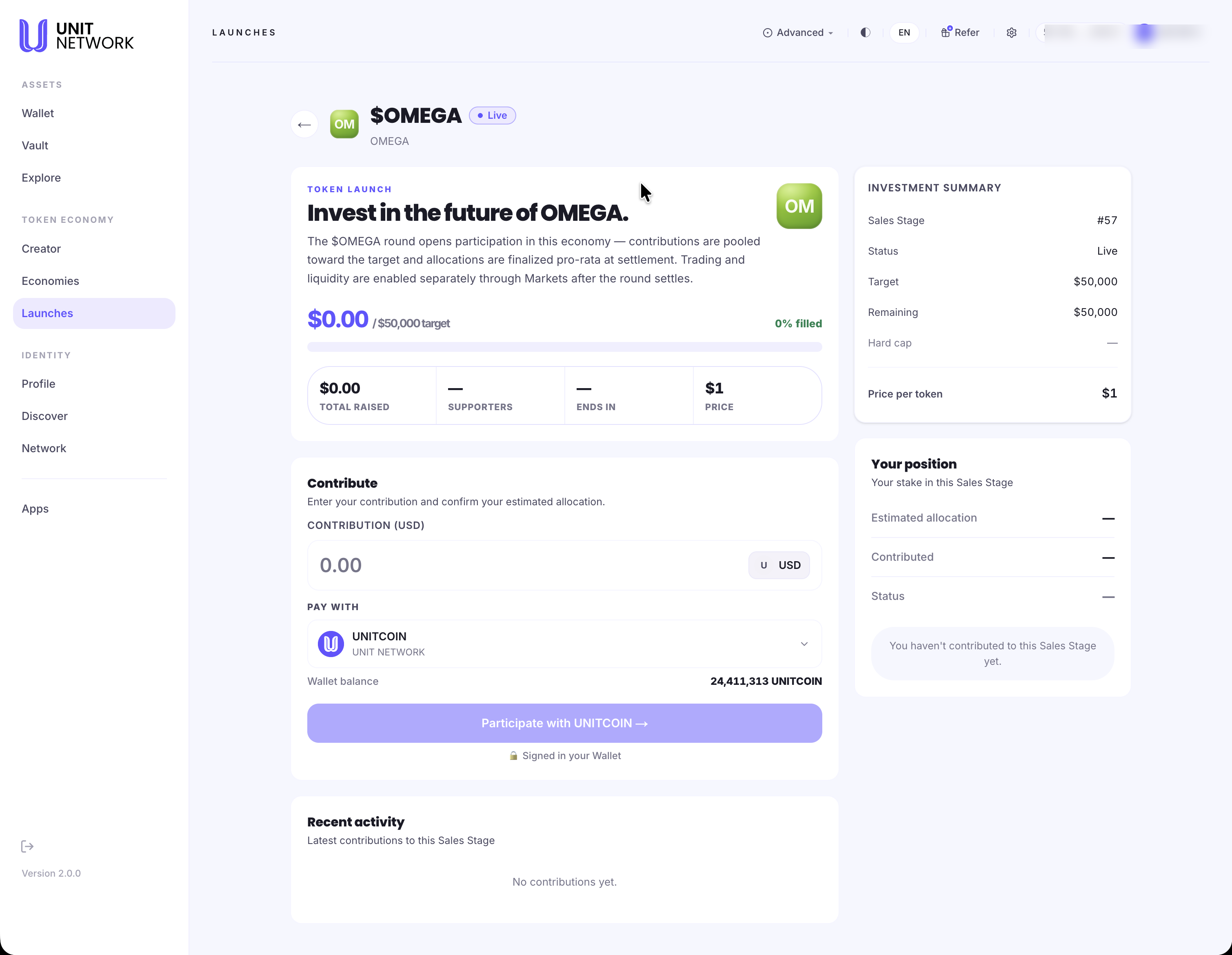
What You Can See
The offer
- Token and status
- The economy's symbol and whether the round is Live.
- What the round is
- A short statement of the offer, including the note that trading and liquidity are enabled separately through Markets after the round settles. Backing a round is not the same as being able to trade the token.
- Progress
- Raised against target, with the percentage filled and a progress bar.
- Total Raised · Supporters · Ends In · Price
- How much has come in, how many people have taken part, how long is left, and what one token costs in this round. Dashes mean there is nothing to report yet.
Contribute
- Contribution (USD)
- Your contribution, entered in dollars.
- Pay with
- The asset you are paying from — UNITCOIN — with your wallet balance shown beneath so you can see what you have to work with.
- Participate
- Submits the contribution. The note beneath confirms you are signed in with your wallet.
Investment Summary
- Sales Stage
- The stage number this round corresponds to — the same stage the economy's owner created in their workspace. This is the clearest sign that a launch and a sale stage are one thing seen from two sides.
- Status, Target and Remaining
- Whether the round is live, what it is raising, and how much is still available. Remaining is the number to watch if you want a meaningful allocation.
- Hard cap
- A ceiling on the round, where one is set. A dash means none.
- Price per token
- What one token costs in this round.
Your position
- Estimated allocation
- What your contribution is currently expected to return. It is an estimate because the final split depends on the whole pool.
- Contributed and Status
- What you have put in, and where it stands. Before you take part, the panel says so plainly.
Recent activity
The latest contributions to the round, so you can see whether it is moving.
Before You Begin
- A UNITCOIN balance — the screen shows yours beside the payment selector.
- An amount in dollars, since that is how contributions are entered.
- An understanding that allocation is pro-rata: what you receive depends on the whole pool, not only on what you put in.
- A signing account connected.
How to Use This Screen
- Open the launch from Launches.
- Check the round is Live.
- Read raised against target and the percentage filled.
- Check Remaining in the Investment Summary — that is what is still available.
- Read Ends In. A round at a low percentage with plenty of time left is a different proposition from one about to close.
- Read the Price per token.
- Enter your contribution in USD.
- Check the wallet balance beneath the payment selector covers it.
- Check Estimated allocation in Your position.
- Select Participate and sign.
- Your contribution appears in Your position and in Recent activity.
What Happens Next
Your contribution joins the pool. It shows in Your position here, in Recent activity, and in the Your Participation row on Launches.
Allocations are finalised pro-rata at settlement — when the round closes, not when you contribute. Trading and liquidity for the token are enabled separately afterwards, through the token's own market.
Tips
- Allocation is decided at settlement, not on arrival. Contributing early does not secure a better allocation; the pool is divided pro-rata.
- Read Remaining alongside Ends In. Together they tell you far more than the percentage filled.
- Backing a round does not mean you can trade the token straight away — the page says trading is enabled separately after settlement.
- The Sales Stage number links this round to the economy's own workspace, which is useful if you are following a project across both.
Related Screens
- Launches — where you find a round
- Sales — the same stage, from the owner's side
- The Token Page — the token itself
- History — where your contribution is recorded
Frequently Asked Questions
- What does "pro-rata at settlement" mean?
- Contributions are pooled, and when the round closes the tokens are divided in proportion to what everyone contributed. Your share depends on the final pool.
- What is a Sales Stage number?
- The economy owner creates a sale stage; it appears here as a round. The number is the same on both sides.
- Can I trade the token straight after contributing?
- No. The page states that trading and liquidity are enabled separately, through Markets, after the round settles.
- What is a hard cap?
- A ceiling on how much the round will accept. A dash means none is set.
- Why is my estimated allocation a dash?
- You have not contributed yet. The panel says so directly.
- Can I contribute more than once?
- Your position shows the total you have put in. Add to it while the round is live.
Troubleshooting
- The launch says it could not be found
- Open it from Launches rather than by typing an address — each launch is identified by both its asset and its round.
- The participate action is unavailable
- Check the round is still Live, that you have entered an amount, and that your wallet balance covers it. The note beneath the button tells you whether you are signed in.
- My contribution is not in Your position
- Confirm the signature was approved. Contributions appear once they settle, and also show in Recent activity.
- Remaining has dropped since I last looked
- Other people are contributing to the same pool. Remaining is live.