Platform Reserves
Overview
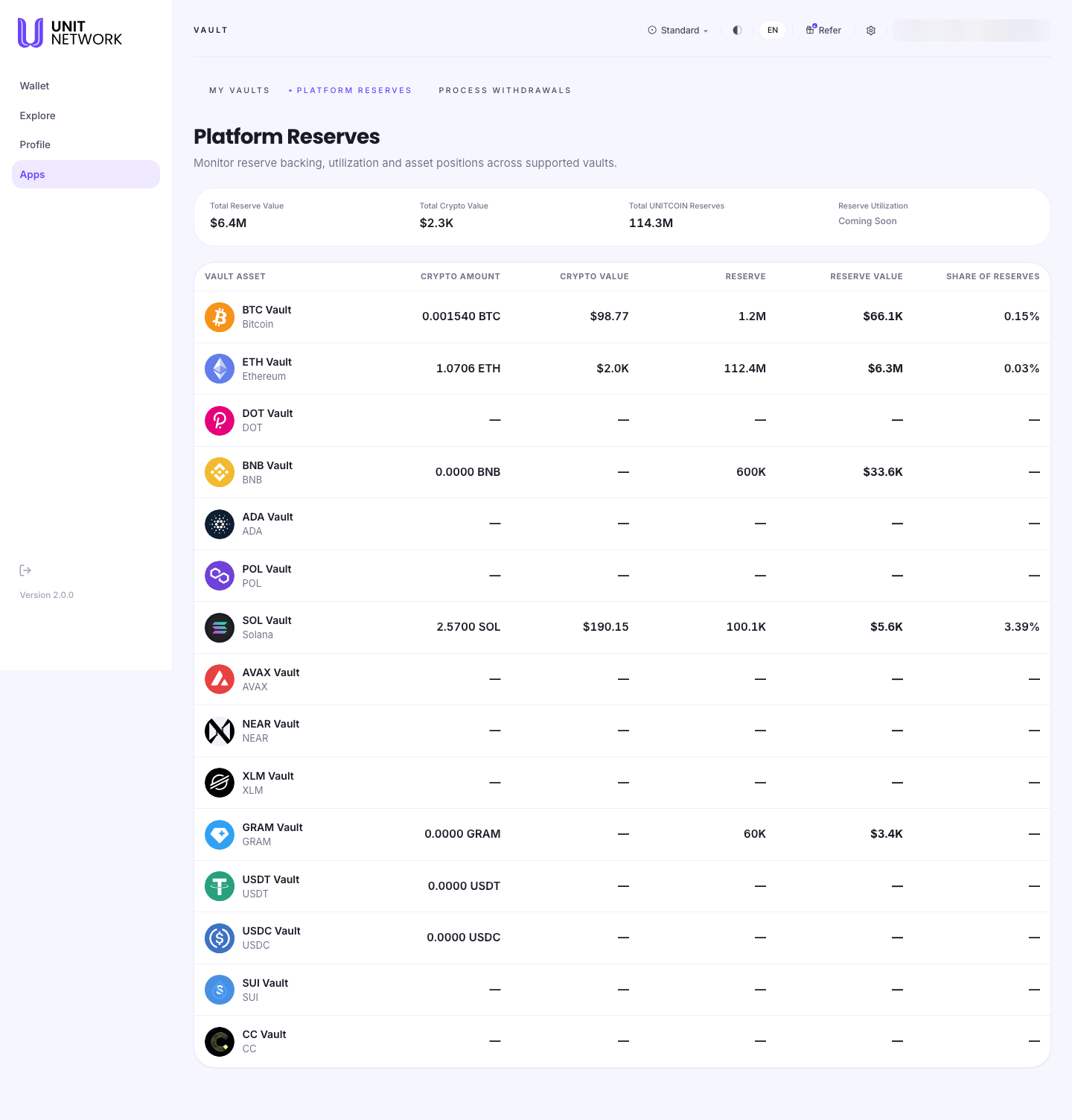
Platform Reserves is the platform-wide view. Where My Vaults shows your own position, this page shows how every vault market is backed — what is held in each asset, and how much UNITCOIN stands behind it.
It is a read-only page. There is nothing to do on it, and it is worth reading before you commit collateral to a market.
What You Can See
- Total Reserve Value
- The value of all UNITCOIN reserves backing vaults across the platform.
- Total Crypto Value
- The value of the assets those vaults currently hold.
- Total UNITCOIN Reserves
- The same backing expressed in UNITCOIN rather than dollars.
- Reserve Utilization
- Marked Coming Soon — this measure is not being shown yet.
- Crypto Amount and Crypto Value
- Per market: how much of the asset is held, and what it is worth.
- Reserve and Reserve Value
- Per market: the UNITCOIN committed behind it, and what that is worth.
- Share of Reserves
- How much of the platform's total backing sits behind that one market.
- Dashes
- A market with nothing held and nothing committed shows dashes rather than zeroes.
The table lists more markets than you can currently open a vault for — several are supported but not yet operating, and show dashes throughout.
Before You Begin
- Nothing. This page is read-only and safe to browse.
How to Use This Screen
Check how a market is backed
- Select Platform Reserves from the Vault tabs.
- Find the asset in the Vault Asset column.
- Read Crypto Amount for what the market holds.
- Read Reserve for the UNITCOIN behind it.
- Compare Crypto Value with Reserve Value — those two are in comparable terms.
See where the platform's backing sits
- Read Total UNITCOIN Reserves for the platform-wide figure.
- Scan Share of Reserves to see which markets carry most of it.
- Note which markets show dashes — supported, but not yet operating.
What Happens Next
Nothing changes from this page. If what you read makes you want to operate a market yourself, go to My Vaults and open a vault for it.
Tips
- Compare Crypto Value against Reserve Value rather than the raw amounts — the units differ, the values are comparable.
- A high Share of Reserves means most of the platform's backing sits behind one market.
- Markets showing dashes are supported but not yet operating.
Related Screens
- My Vaults — your own position rather than the platform's
- Open or Add to a Vault — taking a market on
- Process Withdrawals — the requests these reserves settle
Frequently Asked Questions
- Is this my money?
- No. This is every account's position aggregated. Yours is on My Vaults.
- Why is the reserve value so much larger than the crypto value?
- Reserves are the UNITCOIN committed behind the markets; crypto value is what those markets currently hold. Different measures — they are not expected to match.
- What does "Coming Soon" mean on Reserve Utilization?
- That measure is not being shown yet. Everything else on the page is unaffected.
- Why do some markets show only dashes?
- They are supported but nobody is operating them, so there is nothing to report.
- Can I do anything from this page?
- No. It is read-only.
Troubleshooting
- A value shows a dash where I expected a number
- Either nothing is held in that market, or no current price is available.
- The totals do not match the rows
- The totals cover every market, including any whose individual value cannot currently be priced.
- I cannot find my own vault here
- This page aggregates every account. For your own vault, use My Vaults.