Earn
Overview
Earn is where you stake a token — "Stake your tokens and earn rewards." Staking commits some of your balance, and in return the token pays you a daily reward.
Two tabs: Stake and Unstake. Both run through four stages — 1 Details, 2 Review, 3 Submitting, 4 Completed.
Everything here lives under a token's Earn, and the Earn screen carries a card for each:
- Earn — stake and unstake
- Claim Rewards — collect what you have earned
- Releases — track unstakes and withdraw them
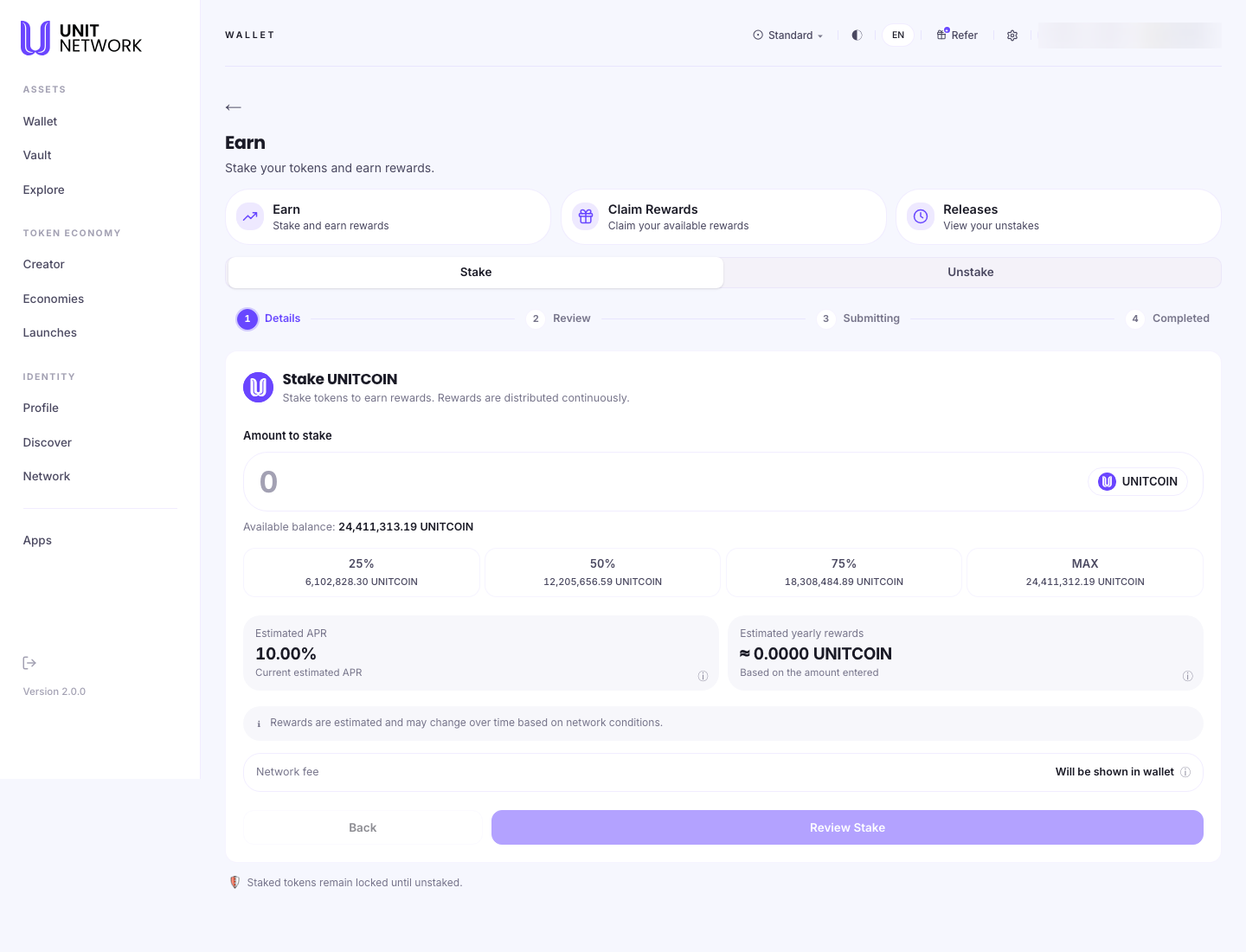
Staking
What you set
- Amount to stake
- With your available balance beneath, and 25%, 50%, 75% and MAX shortcuts. Each shortcut shows the amount it represents, so you can see the figure before choosing it.
MAX is not quite everything. It leaves a small amount of the token behind rather than staking the entire balance — sensible, because the transaction itself needs a fee.
What the screen tells you
- Estimated APR
- The current annual rate, set by the token owner.
- Estimated yearly rewards
- What that rate comes to on the amount you have entered. It updates as you type, which makes it the quickest way to see whether staking is worth it at this size.
- Network fee
- "Will be shown in wallet" — the exact fee appears at the confirmation step.
Both figures are qualified: "Rewards are estimated and may change over time based on network conditions." The APR is not a promise.
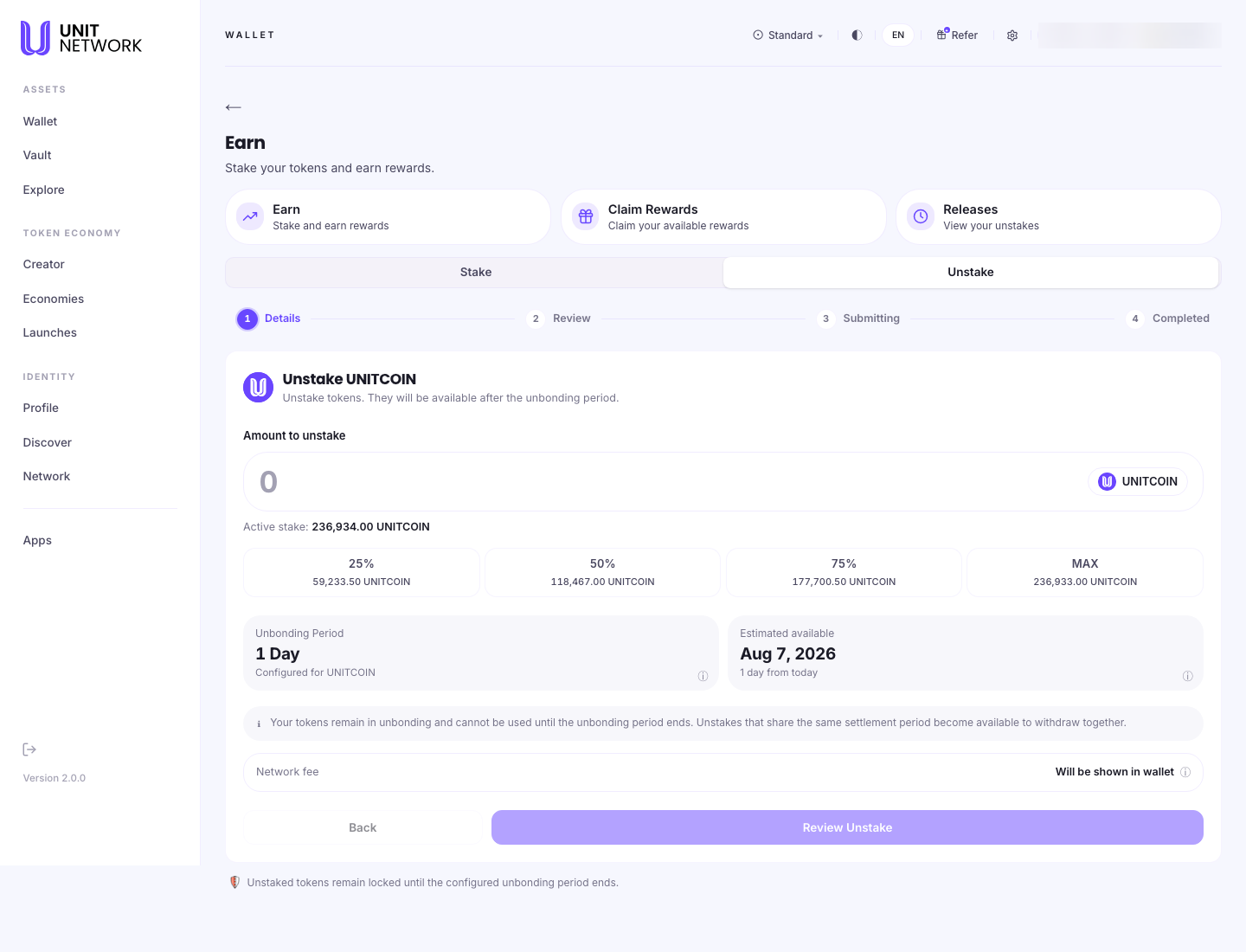
Unstaking
Unstaked tokens enter an unbonding period and are unusable until it ends. During that time they earn nothing.
Releases states the other half plainly: "unstakes cannot be cancelled from this app." Decide before you submit.
- Amount to unstake
- Against your active stake rather than your wallet balance, with the same four shortcuts.
- Unbonding Period
- How long the wait is — "configured for" this token, so it varies by token.
- Estimated available
- The actual date your tokens come back, with how far away it is. This is the figure to read.
One line matters for anyone unstaking more than once: "Unstakes that share the same settlement period become available to withdraw together." Two unstakes on the same day arrive as one withdrawal rather than two.
Before You Begin
- A balance of the token to stake, or an active stake to unstake.
- Enough left over for the fee. This is why MAX holds a little back.
- A look at the rate. The APR is the owner's setting and can change.
- For unstaking: the unbonding period. Read Estimated available before committing — you cannot cancel.
How to Use This Screen
Stake a token
- Open the token from Explore and select Earn.
- Stay on the Stake tab.
- Enter an amount, or use 25%, 50%, 75% or MAX.
- Read Estimated yearly rewards — it updates as you type.
- Select Review Stake and check the figures.
- Sign. Watch the stages run to Completed.
Unstake
- Select the Unstake tab.
- Enter an amount against your active stake.
- Read Unbonding Period and Estimated available. That date is when you get the tokens back.
- Be sure — this cannot be cancelled afterwards.
- Select Review Unstake, then sign.
- Track it on Releases.
Work out what staking would return
- Enter a candidate amount and read Estimated yearly rewards.
- For a fuller projection, use the Estimate My Rewards calculator on the Reward Statement — it breaks the same rate down by day, week and month.
- Leave without staking if the numbers do not suit. Nothing is committed until you sign.
What Happens Next
Staked tokens leave your available balance and start earning. Rewards accrue daily and are collected on Claim Rewards — they are not paid automatically.
Unstaked tokens enter unbonding, appear under Pending Unstakes on Releases, and move to Ready to Withdraw when the period ends.
Tips
- Watch Estimated yearly rewards as you type. It is the fastest sense-check of whether an amount is worth staking.
- MAX deliberately leaves a little behind. That is the fee reserve, not a rounding error.
- Check the unbonding period before staking, not before unstaking. It is how long your tokens are committed once you want out.
- Staking does not collect rewards for you. That is a separate visit to Claim Rewards.
- Unstakes settling on the same day come back as one withdrawal.
Related Screens
- Claim Rewards — collecting what staking earns
- Releases — tracking and withdrawing unstakes
- The Reward Pool — the inventory the rewards are paid from
- Earn (Wallet) — the confirmation step
Frequently Asked Questions
- Does staking lock my tokens forever?
- No, but getting them back takes the unbonding period. The Unstake tab shows exactly how long for this token.
- Why does MAX not stake my whole balance?
- It leaves a little behind so you can still pay the transaction fee.
- Do I earn while unbonding?
- No. Releases states that unstaking does not earn rewards.
- Can I cancel an unstake?
- Not from this app. Be sure before you sign.
- Is the APR fixed?
- No. It is the token owner's setting and the screen calls it estimated.
- Where do rewards go?
- Nowhere until you claim them. See Claim Rewards.
Troubleshooting
- Review Stake will not proceed
- Check an amount is entered and is within your available balance.
- My whole balance will not stake
- Expected — MAX reserves a little for the fee.
- Estimated yearly rewards shows zero
- No amount has been entered yet. It calculates from what you type.
- I unstaked and the tokens are not in my wallet
- They are unbonding. Check Releases for the date they become available.
- The unbonding period is longer than I expected
- It is configured per token, so it differs between tokens.